

.avif)


According to a Deloitte report, nearly 40% of businesses struggle with inefficient purchasing processes that lead to overspending and delays. This issue doesn’t just affect budgets, it slows down operations and limits visibility across teams. That’s why building a clear, efficient purchase order (PO) workflow isn’t just helpful, it’s essential to keeping spending under control and projects on track.
What is a Purchase Order Workflow?
A purchase order workflow is the step-by-step process a business follows to buy goods or services, from identifying a need and approving a request to selecting vendors, receiving orders, and matching invoices. It helps ensure every purchase is necessary, approved, and accurately completed.
Why Purchase Order Workflows are Important?
Purchase order workflow helps maintain budgets as it ensures purchases are necessary and within limits. This speeds up the process by removing bottlenecks and enabling quicker approvals. Workflows also reduce errors through clear processes and foster accountability by defining roles and responsibilities in purchasing.
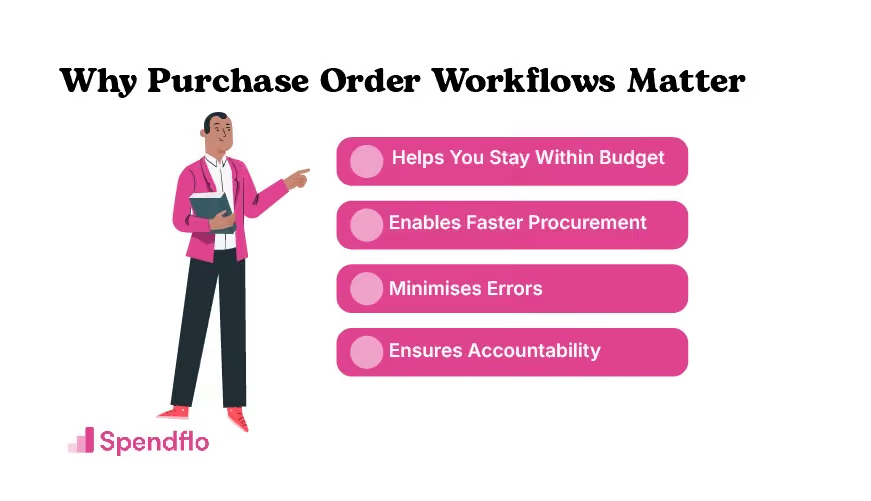
Purchase order workflows matter for many reasons. Let’s look at the most important ones:
1. Keeps Budgets on Track
By following a structured workflow, companies can prevent overspending and make sure every purchase is necessary and within budget. This disciplined approach helps avoid impulse buying and ensures that financial resources are allocated wisely.
2. Helps Speed Up the Process
A streamlined workflow eliminates bottlenecks, ensuring that procurement moves smoothly and efficiently. Faster approvals and clear communication paths mean that orders are processed quickly, reducing downtime and keeping projects on schedule.
3. Reduces Costly Mistakes
A clear, step-by-step process minimizes errors, ensuring that every order is accurate and on point. This reduces the chances of ordering incorrect items, which can lead to costly returns and delays.
4. Building Accountability and Trust
A well-defined workflow clarifies roles and responsibilities, making it easier to track and verify every purchase. This transparency fosters trust among team members and stakeholders, ensuring that everyone is accountable for their part in the procurement process.
What’s the Difference Between a Purchase Order Workflow and a Process?
In procurement, the terms workflow and process often sound similar, but they serve different purposes. Knowing the difference helps teams stay organized, reduce delays, and manage approvals more effectively.
A) Process
A process is the broader framework that outlines what needs to happen and why. In procurement, a process includes everything from identifying a business need to finalizing payments and maintaining records. It defines the overall goal and the main stages that lead to it.
For example, the procurement process covers multiple steps: identifying requirements, obtaining approvals, selecting vendors, managing orders, and closing transactions.
B) Workflow
A workflow focuses on how those steps are carried out. It maps the exact sequence of actions, the people involved, and the approvals required to complete each stage. In other words, a workflow provides the step-by-step instructions that bring a process to life.
For instance, within the procurement process, the purchase order (PO) workflow details how a request moves from creation to approval, order fulfillment, and payment.
C) Key Differences
Here’s a quick comparison to help clarify how they relate to each other:
10 Steps to Create an Efficient PO Workflow
Building an efficient purchase order (PO) workflow means setting up a system where every purchase request moves smoothly from need identification to payment and recordkeeping. When each step is well defined, teams avoid delays, prevent duplicate or unnecessary orders, and maintain complete control over spending.
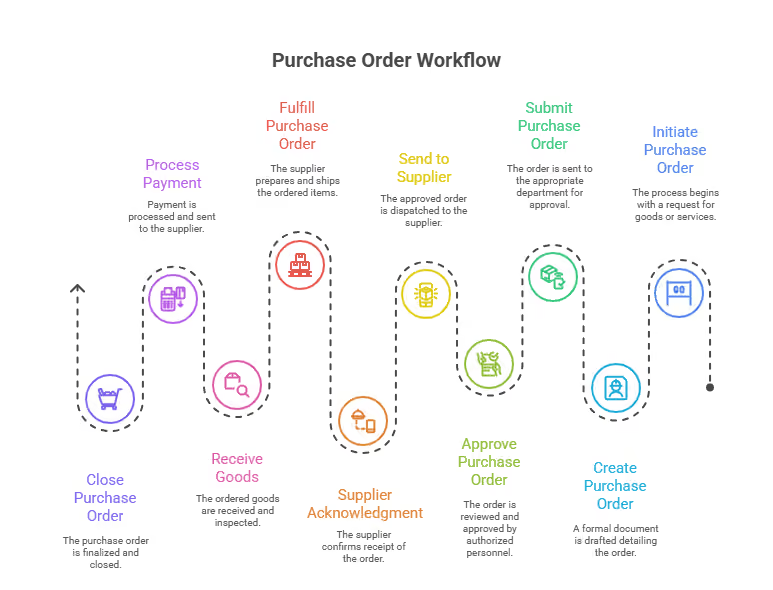
Below is a detailed breakdown of each stage in the PO workflow.
Step 1. Identify the Need for a Purchase
Every purchase starts with recognizing a business requirement, whether it’s new software, office supplies, or equipment. Teams communicate their needs internally to confirm the purpose, quantity, and urgency of the purchase. This helps prevent unplanned or redundant spending before a formal request is made.
Step 2. Create and Submit a Purchase Requisition
Once the need is clear, a purchase requisition is drafted. This document describes what is required, expected quantities, specifications, estimated cost, and the reason for purchase. It also identifies who is requesting it. The requisition acts as a formal request for approval before any commitment is made to a vendor.
Step 3. Approve the Purchase Requisition
The approval stage ensures that purchases align with company budgets and policies. Department heads, finance managers, or procurement officers review the requisition to confirm accuracy, necessity, and budget availability. Digital approval workflows or automation tools can make this step faster and reduce manual follow-ups.
Step 4. Select and Negotiate with Vendors
With approval secured, procurement teams shortlist and evaluate vendors. This involves comparing prices, service quality, delivery timelines, and contract terms. Negotiation is key to securing favorable pricing, warranty terms, and payment conditions. Many companies also assess vendor reliability and compliance at this stage to minimize risk.
Step 5. Issue the Purchase Order
After choosing a vendor, the team prepares a purchase order (PO). The PO acts as an official contract that confirms product details, quantities, pricing, payment terms, and expected delivery dates. Sending this document to the vendor creates a legally binding agreement that ensures both sides are aligned before any goods or services are delivered.
Step 6. Vendor Acknowledgment and Order Fulfillment
Once the vendor receives the PO, they acknowledge it, confirming they can meet the order’s requirements and timelines. They then start preparing the delivery. If there are changes in stock, pricing, or delivery schedules, those are communicated immediately to avoid confusion later in the process.
Step 7. Receive and Inspect Goods or Services
When the order arrives, the receiving team checks the items or services against the purchase order and delivery receipt. They confirm the quantity, quality, and condition of each item. Any issues, such as damaged or missing items, are recorded and reported to procurement or finance for resolution before payment is released.
Step 8. Match Invoices with Purchase Orders (Three-Way Matching)
This step ties everything together. The purchase order, vendor invoice, and delivery receipt are compared to make sure all details, including quantities, prices, and terms, match correctly. Three-way matching prevents overpayments and ensures that the organization only pays for approved and received items.
Step 9. Process the Payments
Once verification is complete, the finance team schedules payment based on the agreed terms. Timely payment helps maintain positive vendor relationships and ensures that future orders are prioritized. Automated systems can simplify this step by tracking due dates and sending reminders for approvals.
Step 10. Maintain Records and Close Purchase Orders
The final stage involves archiving all related documents, requisitions, POs, delivery notes, invoices, and payment confirmations. Keeping accurate records supports audits, budgeting, and future purchase analysis. Once the records are filed, the purchase order is marked as closed, completing the cycle.
Common Challenges in Purchase Order Workflow
Even with a clear and well-structured purchase order (PO) workflow, many businesses still face hurdles that affect efficiency and accuracy. These challenges often arise from manual processes, communication gaps, or limited visibility across departments.
Here are some common challenges organizations encounter when managing purchase orders:
1. Approval Delays
Waiting too long for approvals can bring procurement to a halt. When purchase requisitions sit in inboxes without timely action, it slows down purchasing, disrupts project timelines, and can even lead to missed opportunities for vendor discounts. Automating approvals or setting clear approval hierarchies can help prevent bottlenecks.
2. Communication Gaps
Miscommunication between procurement, finance, and vendors often leads to duplicated requests, incorrect orders, or delayed deliveries. Without clear updates or centralized communication, small misunderstandings can quickly escalate into costly errors.
3. Inconsistent Documentation
Missing or incomplete documentation makes it hard to track the status of an order or reconcile payments later. When details like vendor names, item quantities, or approval dates are inconsistent, it can create confusion during audits or when resolving disputes.
4. Vendor Issues
Problems on the vendor side, such as late shipments, incorrect quantities, or quality concerns, can disrupt daily operations. Maintaining regular vendor evaluations and clear service-level agreements (SLAs) helps businesses identify reliable suppliers and address issues early.
5. Limited Visibility Across Teams
Without centralized systems, different departments may not have access to real-time purchase data. This lack of visibility makes it difficult to manage budgets, monitor spending, and forecast future needs accurately.
Benefits of Integrating Purchase Orders with Inventory Management
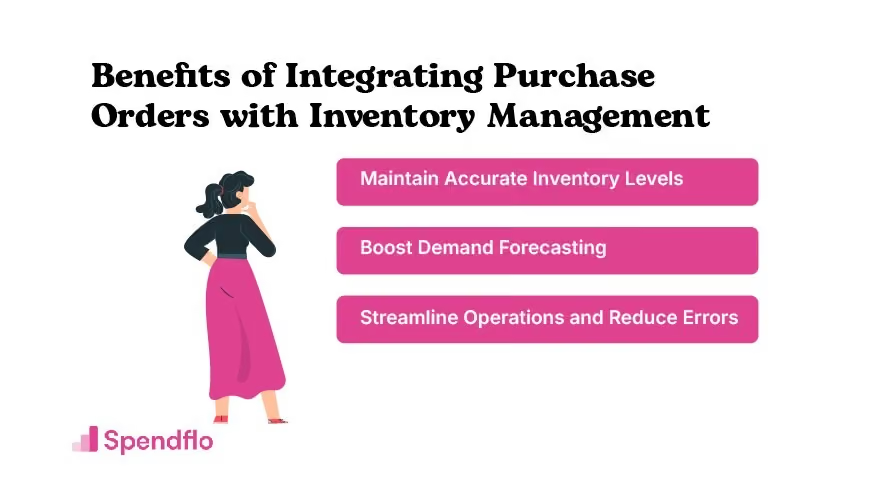
Integrating purchase orders (POs) with inventory management systems bridges the gap between procurement and operations. When these systems work together, businesses gain better visibility into stock levels, reduce manual work, and make smarter purchasing decisions. This connection ensures that every approved order automatically updates inventory records, reducing the risk of errors and inefficiencies.
Here are the key benefits of integrating purchase orders with inventory management:
1. Better Stock Control
Real-time integration ensures your inventory data is always accurate. When a purchase order is approved, the inventory system updates instantly, showing what’s on order, what’s in stock, and what’s been received. This helps teams avoid stockouts, prevent overstocking, and maintain just the right level of inventory to meet demand.
For example, if a warehouse runs low on a specific product, the system can trigger a PO automatically. This not only saves time but also ensures the right materials are available exactly when needed.
2. Improved Demand Forecasting
Accurate data is the foundation of reliable forecasting. When purchase and inventory systems are connected, procurement and finance teams can access real-time trends on usage, reorder frequency, and seasonal demand. This allows them to make data-backed decisions about when and how much to order, reducing waste, optimizing spend, and aligning purchases with business needs.
3. Enhanced Efficiency
Integration eliminates repetitive manual tasks that slow down procurement. Instead of entering order details and stock updates separately, automation handles the process end to end. Each PO automatically updates inventory counts upon delivery, which saves time, reduces human error, and simplifies month-end reconciliation.
This efficiency helps both procurement and finance teams focus on strategy, like vendor negotiations and cost optimization, rather than administrative work.
4. Increased Visibility and Accountability
With both systems synced, stakeholders have a single source of truth. Finance, procurement, and operations teams can all view the same real-time data, from pending POs to incoming stock and vendor performance. This transparency improves accountability and enables faster decision-making across departments.
5. Cost Savings and Better Resource Planning
Integration doesn’t just save time, it also drives measurable cost savings. By minimizing duplicate orders, reducing emergency purchases, and maintaining optimal inventory levels, companies can avoid unnecessary expenses. Over time, this leads to stronger cash flow management and improved ROI on procurement tools and inventory systems.
Best Practices for Purchase Order Workflow
A strong purchase order (PO) workflow keeps procurement efficient, compliant, and error-free. Without structure, approvals can get stuck in email threads, leading to delays, overspending, or unapproved purchases.
Establishing clear policies, automating workflows, and ensuring visibility across departments helps create a smooth, accountable system for managing purchase requests.
Here are the best practices for managing purchase order approvals effectively:
1. Set Clear Approval Hierarchies
Every organization should have a defined chain of approval based on purchase value, department, or expense type.
For instance, smaller purchases might only need a manager’s sign-off, while high-value purchases require additional review from finance or leadership.
This structure eliminates confusion about “who needs to approve what” and ensures that purchase requisitions don’t get lost in the process. A well-defined hierarchy also helps maintain budget control and prevents unauthorized spending.
2. Automate Approvals
Manual approval processes can be slow and prone to human error. Automation tools or procurement platforms can route requests directly to the right approvers, send reminders, and even flag requests that exceed budget limits.
Automated workflows speed up decision-making, reduce administrative workload, and provide a digital trail for every approval. This not only improves efficiency but also ensures compliance with internal procurement policies.
3. Maintain Transparency Across Teams
Lack of visibility often leads to delays and frustration. Keeping all stakeholders, from requesters to approvers and finance, informed at each stage builds accountability and trust.
Transparency tools, such as centralized dashboards or automated status updates, make it easy to track where each request stands. Everyone can see what’s pending, approved, or rejected, minimizing miscommunication and follow-up emails.
4. Conduct Regular Audits
Regularly reviewing the approval process helps identify bottlenecks, policy gaps, or unnecessary steps that slow things down.
Audits can also reveal patterns, such as departments frequently exceeding budgets or vendors causing delays, allowing you to refine your approval rules.
A quarterly or bi-annual audit ensures your approval workflow stays compliant, efficient, and aligned with business goals.
5. Standardize Documentation
Consistency in documentation makes approvals faster and easier to verify. Use standardized purchase requisition and PO templates so that all required information, such as vendor details, pricing, and justification, is always included.
Standardization reduces back-and-forth communication and ensures that approvers have all the data they need to make informed decisions.
6. Set Approval SLAs
Establish service-level agreements (SLAs) for how long approvals should take. For example, managers might be expected to review requests within 24 hours, while finance could have 48 hours for final sign-off.
Setting SLAs keeps the process moving and ensures accountability at every level, especially in larger organizations where approvals pass through multiple departments.
Automating Your Purchase Order Workflow
Automating your purchase order process or workflow is a significant step forward. A procurement software can automate manual tasks and integrating it your inventory management system prevents overstocking. Additionally, automated approval workflows can speed up the overall PO process and minimize or eliminate delays.
Here are three ways you can achieve automation in your purchase order process:
1. Implement Procurement Software
Use procurement software that automates tasks like requisition submission, approval workflows, and PO generation. This software reduces manual errors and ensures that each step of the process is followed consistently.
2. Integrate with Inventory Management Systems
Automate your PO process by integrating it with inventory management systems, ensuring that stock levels are automatically updated as orders are processed. This helps prevent overstocking and improves overall efficiency.
3. Set up Automated Approval Workflows
Establish automated approval workflows that route purchase requisitions to the appropriate managers for quick approval. Automated reminders can be set to ensure that approvals are not delayed, speeding up the entire process and maintaining operational momentum.
How Spendflo Can Help Setting Up Purchase Order Workflows
Manual purchase order workflows can slow down procurement, create approval bottlenecks, and lead to budget overruns. Many finance and procurement teams spend hours chasing approvals, tracking vendor updates, or reconciling mismatched invoices, time that could be spent on strategic decisions instead.
That’s where Spendflo makes the difference!
A growing SaaS company recently used Spendflo to automate its PO workflow across departments. Within 60 days, it reduced approval times by 40% and gained complete visibility into every purchase request, from requisition to payment. Teams stopped relying on spreadsheets and manual follow-ups, and month-end reconciliations became nearly effortless.
If your procurement process still depends on manual tracking or disconnected tools, you’re not alone. Many organizations face delays, errors, and poor visibility that cost both time and money.
Spendflo solves this by automating every step of your PO workflow, from requisition submission to purchase order creation, approval routing, and real-time inventory sync. You’ll get faster approvals, fewer errors, and clearer insights into company-wide spending, all within a centralized platform.
Ready to simplify your purchase order workflows and save time on every transaction? Book a free demo with Spendflo today.
Frequently Asked Questions About Purchase Order Workflows
What is a Purchase Order Workflow?
A purchase order workflow is a series of steps that an organization follows to complete a purchase. It includes creating a purchase request, getting approvals, finding a vendor, issuing purchase order, and ensuring the order fulfillment. All this ensures transparency, efficiency, and accountability of procurement.
What is the purpose of a Purchase Order Workflow?
A Purchase Order (PO) workflow ensures that all purchasing activities follow a consistent, structured process. This workflow helps in maintaining accountability, preventing errors, and ensuring that purchases are necessary and within budget. By following a PO workflow, organizations can improve efficiency, reduce costs, and maintain better control over their procurement processes.
How can I automate my Purchase Order process?
You can automate your Purchase Order process by implementing procurement software that streamlines tasks such as requisition submission, approval workflows, and PO generation. These tools often include features like automated reminders, integration with inventory management, and real-time tracking, which help eliminate manual errors and speed up the entire process. Automation also ensures that your procurement process is consistent and compliant with company policies.
What are common challenges in Purchase Order management?
Common challenges in Purchase Order management include delays in the approval process, communication gaps between departments, inconsistent documentation, and issues with vendor reliability. These challenges can lead to inefficiencies, increased costs, and disruptions in the supply chain. Addressing these challenges often requires better process alignment, enhanced communication tools, and the use of automation to ensure consistency and timeliness.
If manual POs are eating up your team’s time, check out how our purchase order management system turns your process into a smooth, error-free flow.
What tools can help with Purchase Order workflows?
Several tools can streamline and automate Purchase Order workflows, including spend management platforms, ERP systems, and specialized procurement software. These tools help manage tasks like requisition submissions, approvals, and vendor selection while providing real-time tracking and analytics. By implementing these tools, businesses can improve the efficiency, accuracy, and compliance of their procurement processes.


-compressed.avif)














.avif)
.avif)