
What's New



Meet Spendflo’s new AI procurement team
New AI agents, smarter workflows, and an updated Help Center to help your team get more from Spendflo.
We have launched a new set of AI features designed to help procurement teams move faster from request to payment.
Flo now brings together specialist agents for procurement, contracts, and accounts payable. Your team can also build custom agents for the checks and handoffs that are unique to your business.
Here is what is new.
Flo Procure
Turn a request written in plain English into structured intake.
Flo Procure helps requesters start the right process without searching for forms or guessing which fields to complete. It can identify the right workflow, fill in details that Spendflo already knows, and guide the requester through anything that is still missing.
It also supports supplier onboarding, approval routing, and PO creation. When a request needs a human decision, Flo hands it over with the relevant context.
What your team can do:
- Raise a purchase request in plain English.
- Start supplier onboarding alongside the request.
- Route approvals using the right workflow.
- Reduce incomplete intake and manual follow-ups.
- Keep requesters updated on what happens next.
Flo Contracts
Review agreements faster and focus on the clauses that matter.
Flo Contracts reads uploaded agreements and turns important details into structured information. It extracts key fields, flags unusual or non-standard clauses, and tracks obligations and renewal dates.
Your team can ask questions about a contract in plain English and see the relevant wording without searching through every page.
What your team can do:
- Extract important contract details automatically.
- Spot unusual clauses earlier in the review.
- Track obligations and upcoming renewals.
- Ask questions about an agreement in plain English.
- Spend more time on exceptions that need judgment.
Flo AP
Keep clean invoices moving and surface issues sooner.
Flo AP matches bills against purchase orders and contracts. If an amount or detail does not line up, it flags the difference for review. Clean invoices can move forward with less manual work.
Because Flo AP works with the same supplier, request, PO, and contract information, finance gets a clearer view of the full purchasing process.
What your team can do:
- Match bills against POs and contracts.
- Find differences before payment.
- Move clean invoices forward faster.
- Reduce manual checking and back and forth.
Ask Flo from anywhere in Spendflo
Flo AI is available from My Hub, and Ask Flo can be opened while you are working elsewhere in Spendflo.
You can raise a request, find information, attach a document, reference a Spendflo record with @, or ask what needs to happen next. Flo uses the context of the page you are on, so you do not need to explain everything again.
Build Custom AI Agents
Agent Studio lets you build agents for the processes that are specific to your company.
Give an agent clear instructions, choose which Spendflo data it can use, and connect it to policies or reference documents through the Context Library.
Custom agents can help with work such as:
- Checking a request against policy.
- Spotting missing supplier information.
- Finding duplicate suppliers or existing contracts.
- Summarizing approvals and open questions.
- Pulling specific values from documents.
- Preparing a short risk brief for review.
Add agents to your workflows
Published agents can run as steps inside Spendflo workflows.
An agent can use information from earlier steps, return structured outputs for later steps, and pause for a person to review before the workflow continues.
Workflow owners can map inputs, choose outputs, require confirmation, approve the result, or run the step again with updated information. Every attempt is recorded in the run history.
Manage agents with confidence
Custom agents use a draft and publish model. You can update instructions without changing the version that is already live. Publish the new version when it is ready.
Version history shows what was published and by whom. Spendflo also shows which workflows use an agent before it is deleted, helping admins avoid breaking an active process.
Give agents the right company context
The Context Library stores reusable knowledge such as procurement policies, category guidelines, security requirements, and reference documents.
More than one agent can use the same context. This gives your agents a shared source of guidance and saves your team from copying the same instructions into every agent.
The Spendflo Help Center is now fully updated
We have refreshed the Spendflo Help Center with the latest guidance across the platform.
You can now find new and updated articles for Flo AI, Custom AI Agents, requests, approvals, supplier management, procure to pay, reports, integrations, settings, and more.
Whether you want a quick overview of a new feature or a step-by-step guide, the Help Center is the best place to start learning.
Explore the updated Spendflo Help Center
We've rebuilt how you work inside Spendflo - not just a new look, but a fundamentally different experience for modern procurement, finance, legal, and operations teams. Denser data tables, inline actions, cleaner settings, and structured workflow views mean less jumping around and more getting things done. The result: faster decisions, every step of the procurement lifecycle.
1. Workspace Navigation & Dashboard Consolidation
The global navigation has transitioned entirely into a highly efficient, single left-side panel. This approach centralizes user-level navigation, account controls, and platform configurations, consolidating what was previously spread across multiple navigation layers into a single, unified panel.
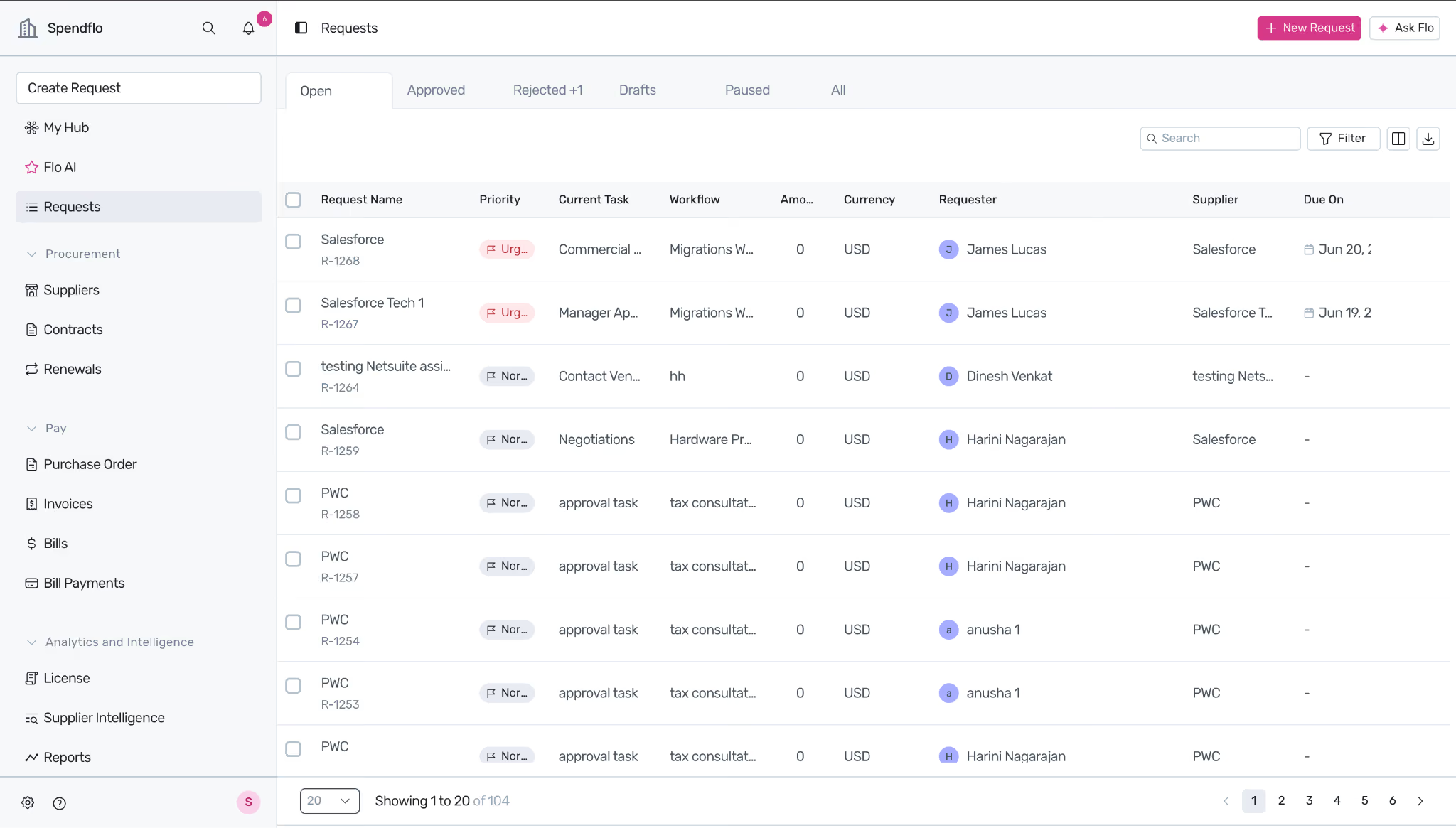
- Persistent Left Navigation Sidebar: All core operational hubs—including My Hub, Requests, Procurement (Suppliers, Contracts, Renewals), Purchase Orders, Invoices, Bills, Bill Payments, and Analytics—are permanently docked to provide 1-click navigation across independent modules.
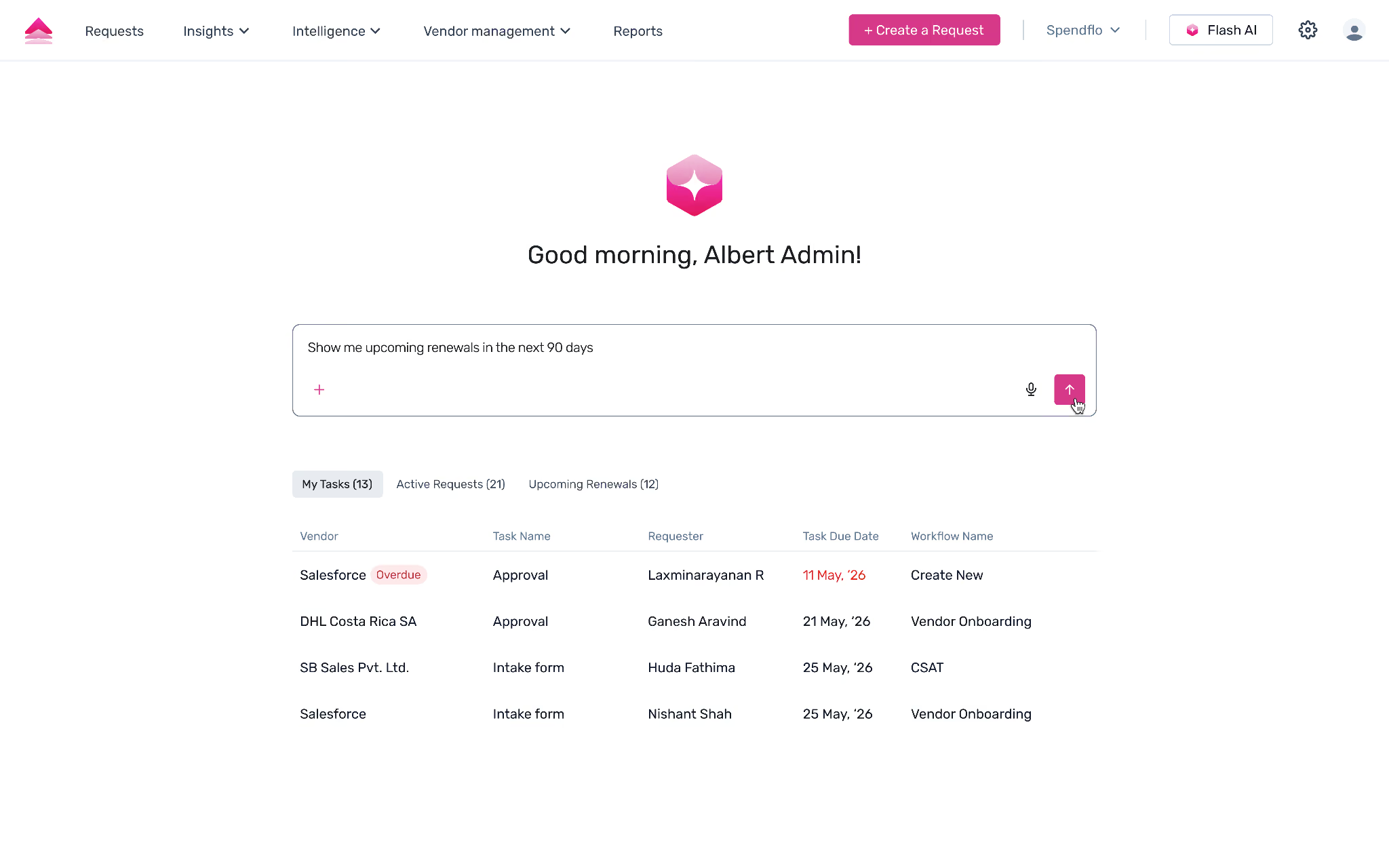
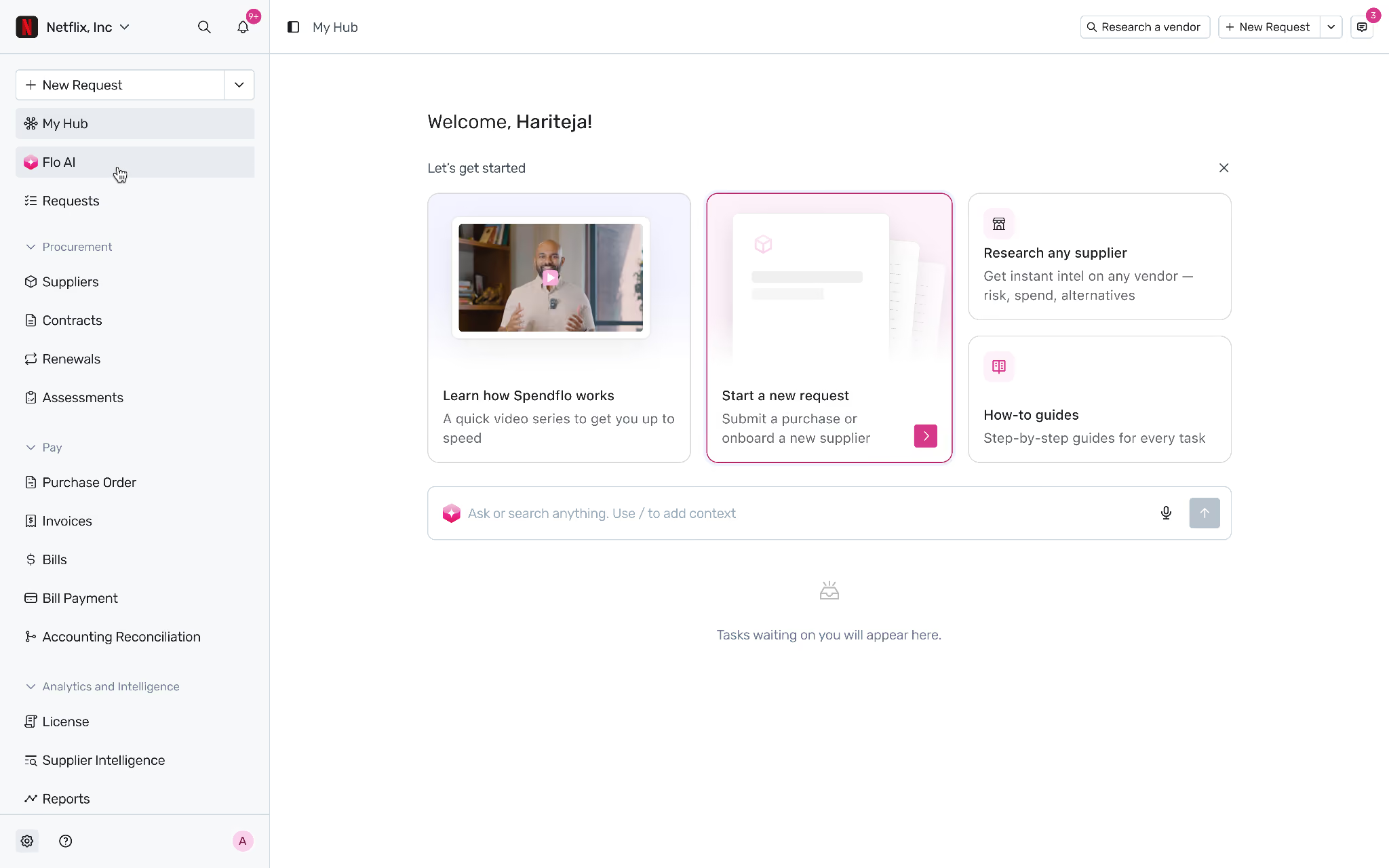
- Flo AI Accessibility: What was a standalone Call-to-Action (CTA) button has now been promoted into a persistent navigation choice embedded directly inside the My Hub homepage workspace. This change bridges conversational assistance seamlessly with everyday tracking.
- Global Create Control: A high-contrast, prominent "Create Request" button remains pinned at the very top of the navigation pane to drive actions effortlessly from any view.
- Inline Record Prioritization: Users can now adjust request urgency parameters (toggling between Normal and Urgent states) directly from the primary listing and summary rows without clicking into individual records. These states remain editable dynamically until the target task reaches complete status.
2. The Shift to Visual "Workflow Views"
The traditional timeline panel layout and its separate "View Workflow" utility button have been fully replaced. Individual request screens now load directly into a horizontal, interactive, node-based workflow grid.
[ Intake / Drafts ] ──► [ IT Review (In Progress) ] ──► [ Security / Finance ] ──► [ Approved & Signatures ]
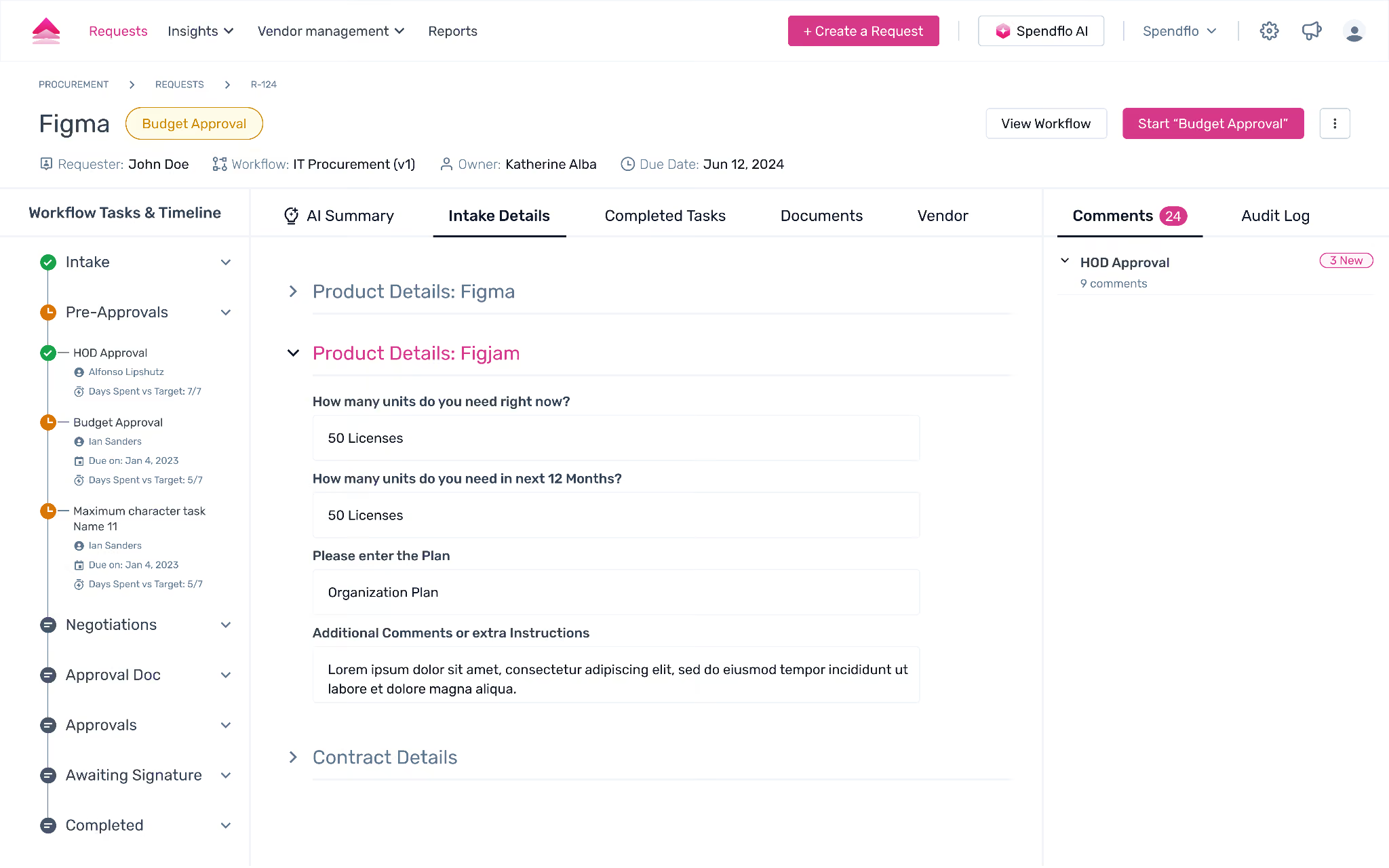
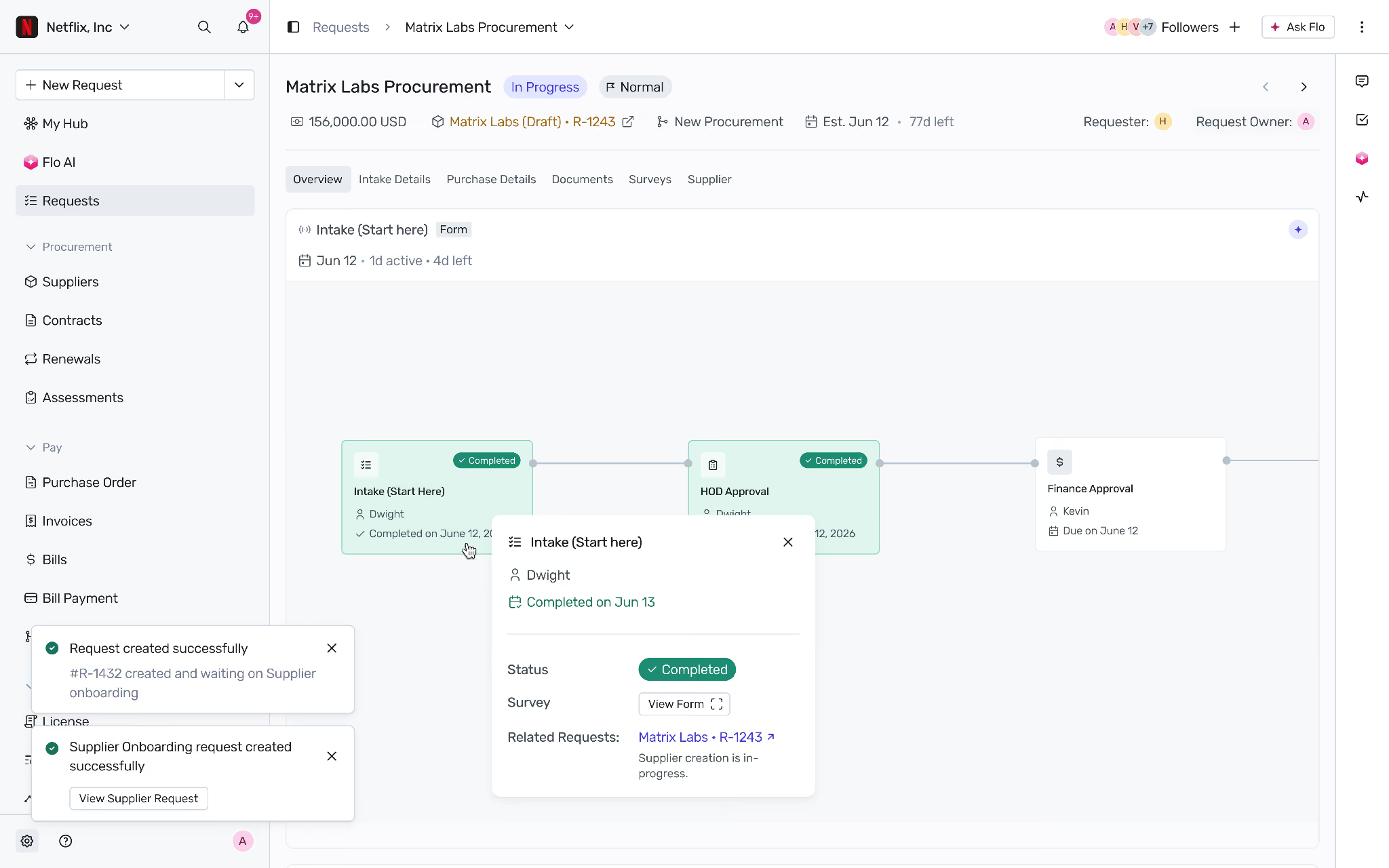
This architectural visual model drastically changes how data updates are handled inside your ongoing procurement pipelines:
- Color-Coded Status Tracking: Workflow boxes immediately signal progress at a glance. Active or pending steps pulse in high-contrast blue blocks, completed stages turn green, and unreached milestones remain grayed out.
- In-Context Form Execution: Clicking a specific node opens an instant edit panel directly over the active stage. Users can update target fields, attach contextual milestones, change dates via inline calendar popups, or assign specific stakeholders without leaving the visual roadmap.
- Dual-Path Ecosystem Links: Integrations with tools like Jira or NetSuite are now hyper-accessible. Deep links and synchronization icons are exposed in both the generic task information banners and right inside the active workflow node itself. This setup ensures a quick, 1-click transition to external systems.
- Integrated Approval Callouts: For active validation steps, approval CTAs are placed directly within the workflow block as well as the side configuration pane, ensuring clear and accessible paths for critical sign-offs.
3. Standardized Nomenclature & Rebranding Matrix
To improve multi-tier operations, match industry terminology, and resolve administrative ambiguity, several legacy application tags have been renamed.
4. High-Density Tables & Advanced Document Previews
To support complex procurement datasets, operational rows utilize a high-density grid design paired with automated warning badges.
- The "Coming Up" Visibility Tier: Under the Contracts module, a brand-new Coming Up filter tab has been introduced. This enables teams to monitor newly signed files with future effective start dates, a functionality missing in previous builds.
- Urgency Tracking Badges: Status pillars inside the Renewals grid leverage high-contrast inline visual flags (such as 7d overdue or Alerted markers) placed next to Supplier metrics to mitigate compliance gaps before contract expiration loops hit.
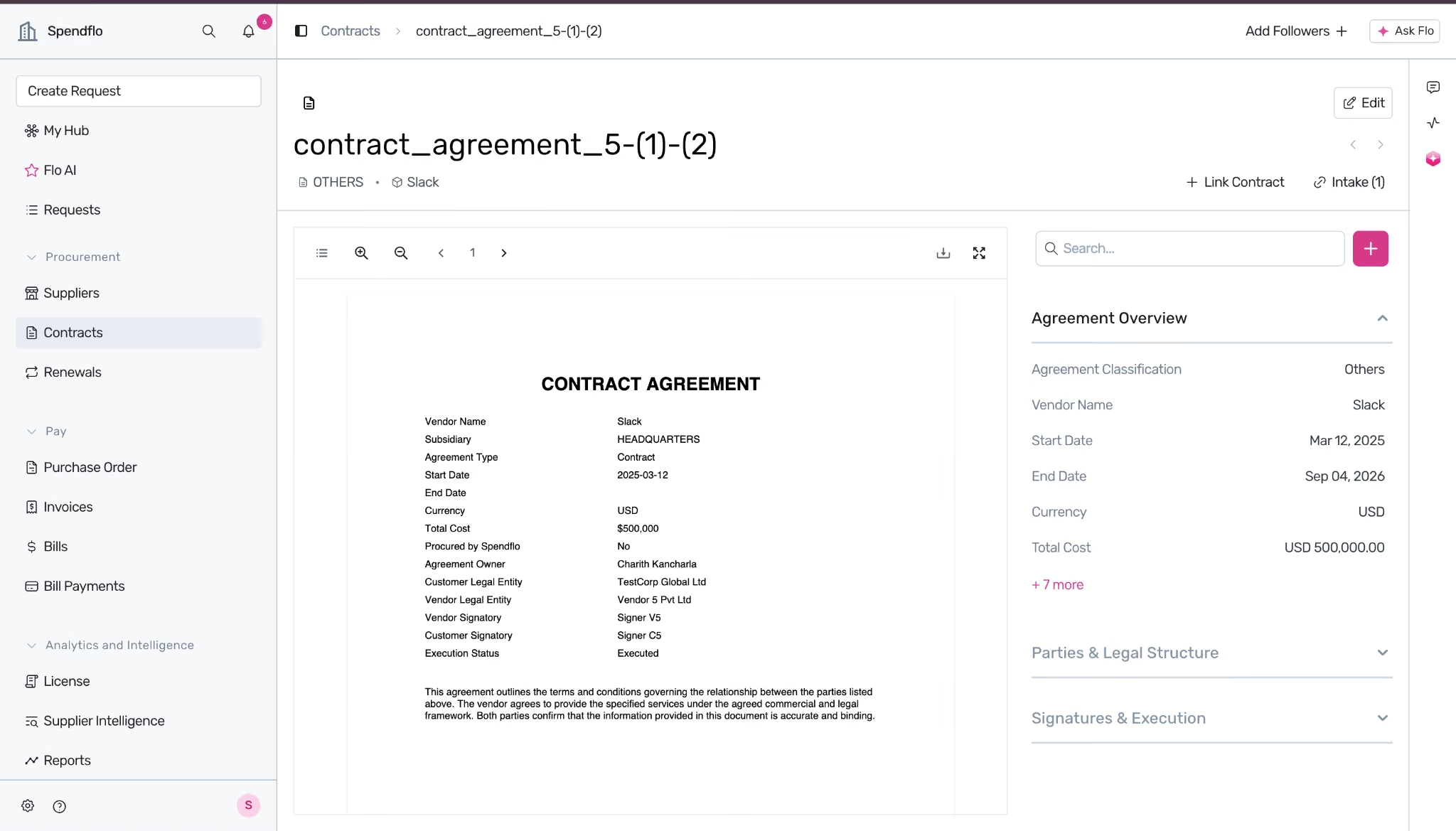
- Dual-Pane Review Workspace: Drilling down into contracts or renewal tracks triggers an optimized side-by-side workspace split:
- Left Screen Pane: Implements a native document layout rendering live MSAs, order sheets, or service forms with crisp zooming mechanics.
- Right Screen Pane: Generates a data panel breaking down extracted insights into structured accordions, balancing unstructured source text seamlessly alongside tabular tracking variables.
5. Admin Configuration & Settings De-cluttering
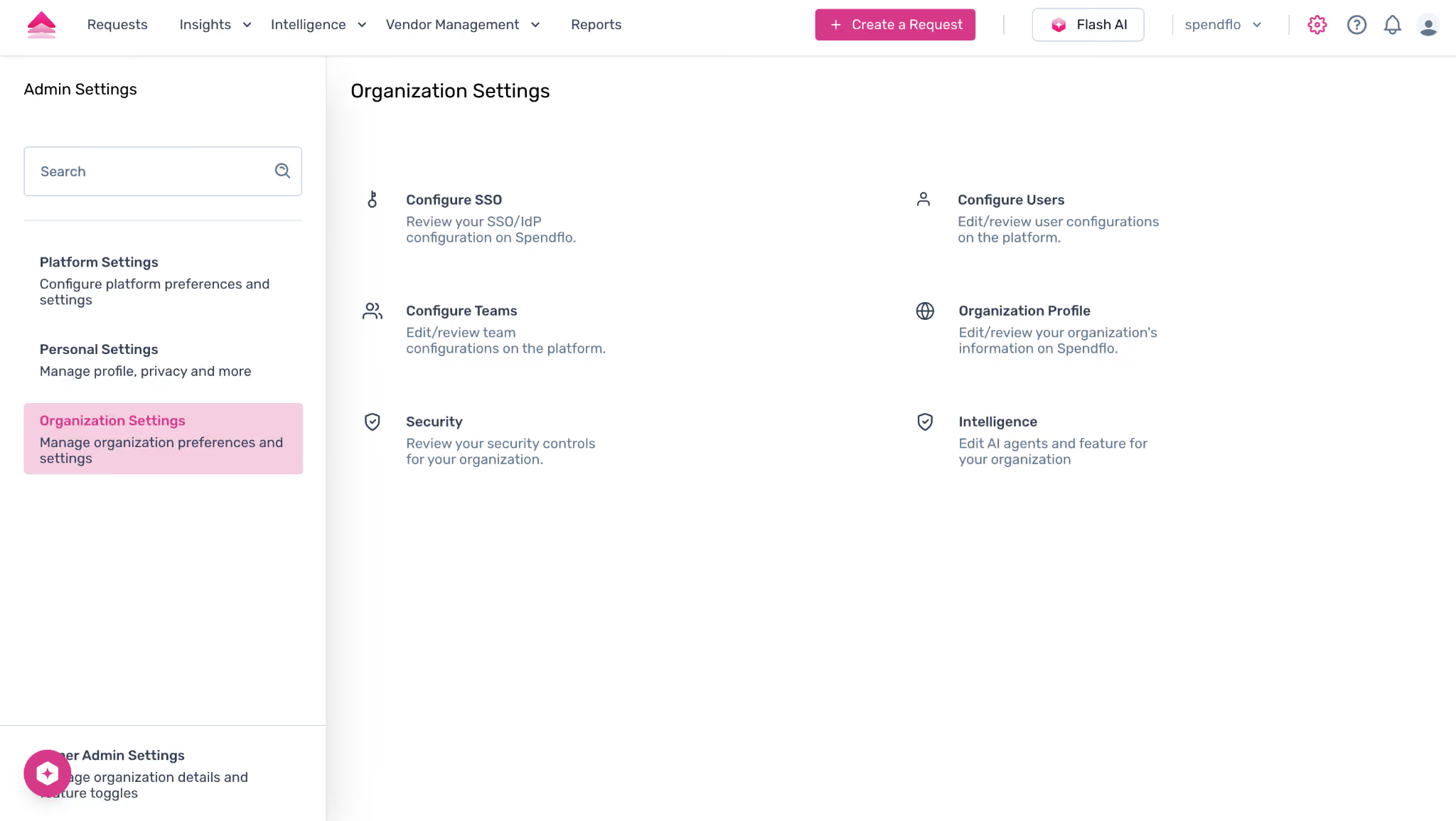
Spendflo has officially removed fragmented administrative dividers such as Platform Settings, Personal Settings, and Organization Settings. The settings dashboard now groups these configurations into a unified, consolidated experience:
- People & Teams Consolidation: Previously split into two isolated, independent configuration workflows, Configure Users and Configure Teams are now unified under a singular, cross-functional People & Teams directory screen. Users, parent teams, and cross-functional administrative permissions can be managed from a centralized hub.
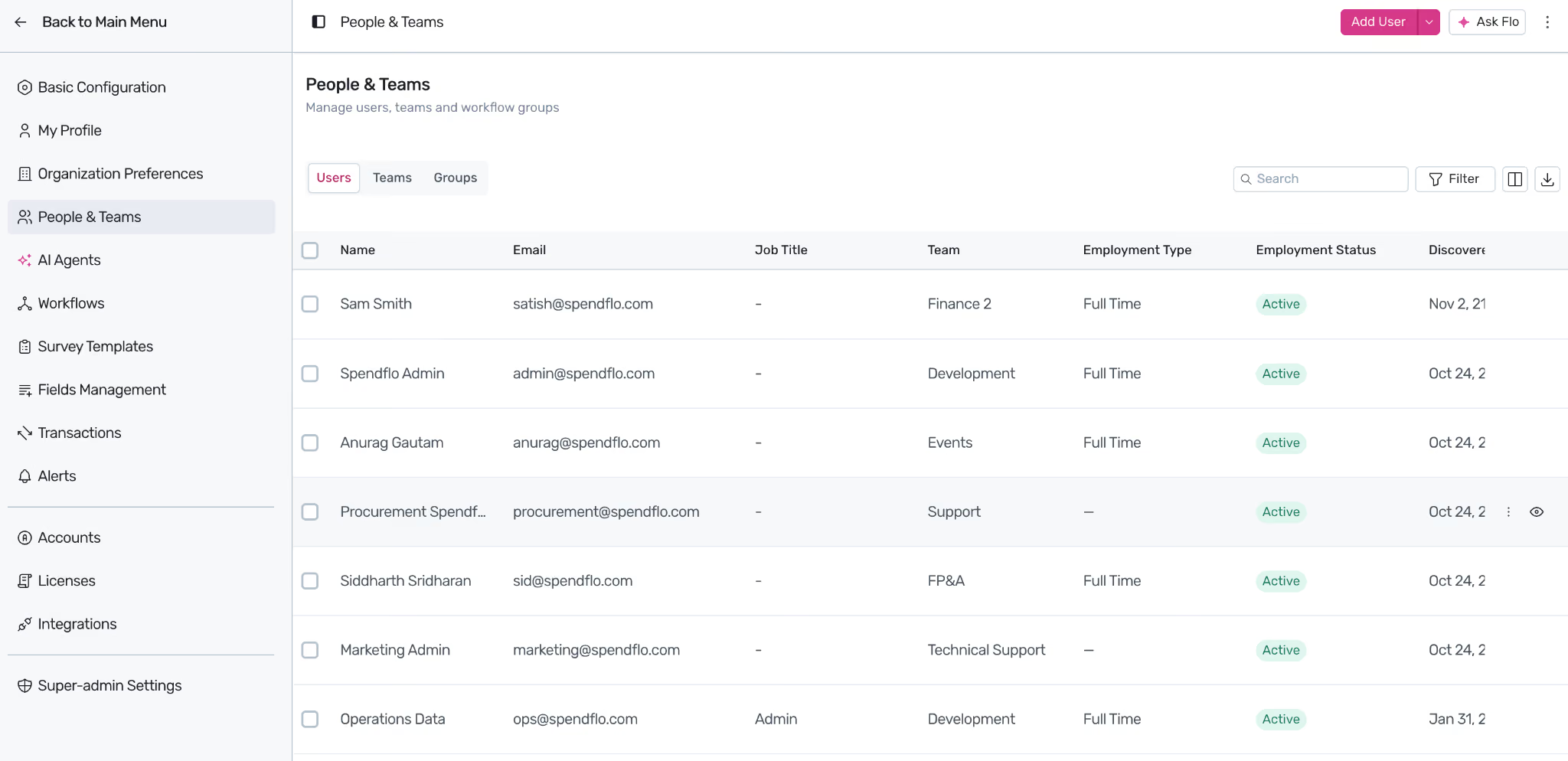
- Organization Preferences: Core settings such as currency setups, localized constraints, and regulatory rules have been grouped under a single control pane, neatly split across Finance, Infosec, and Legal criteria tabs.
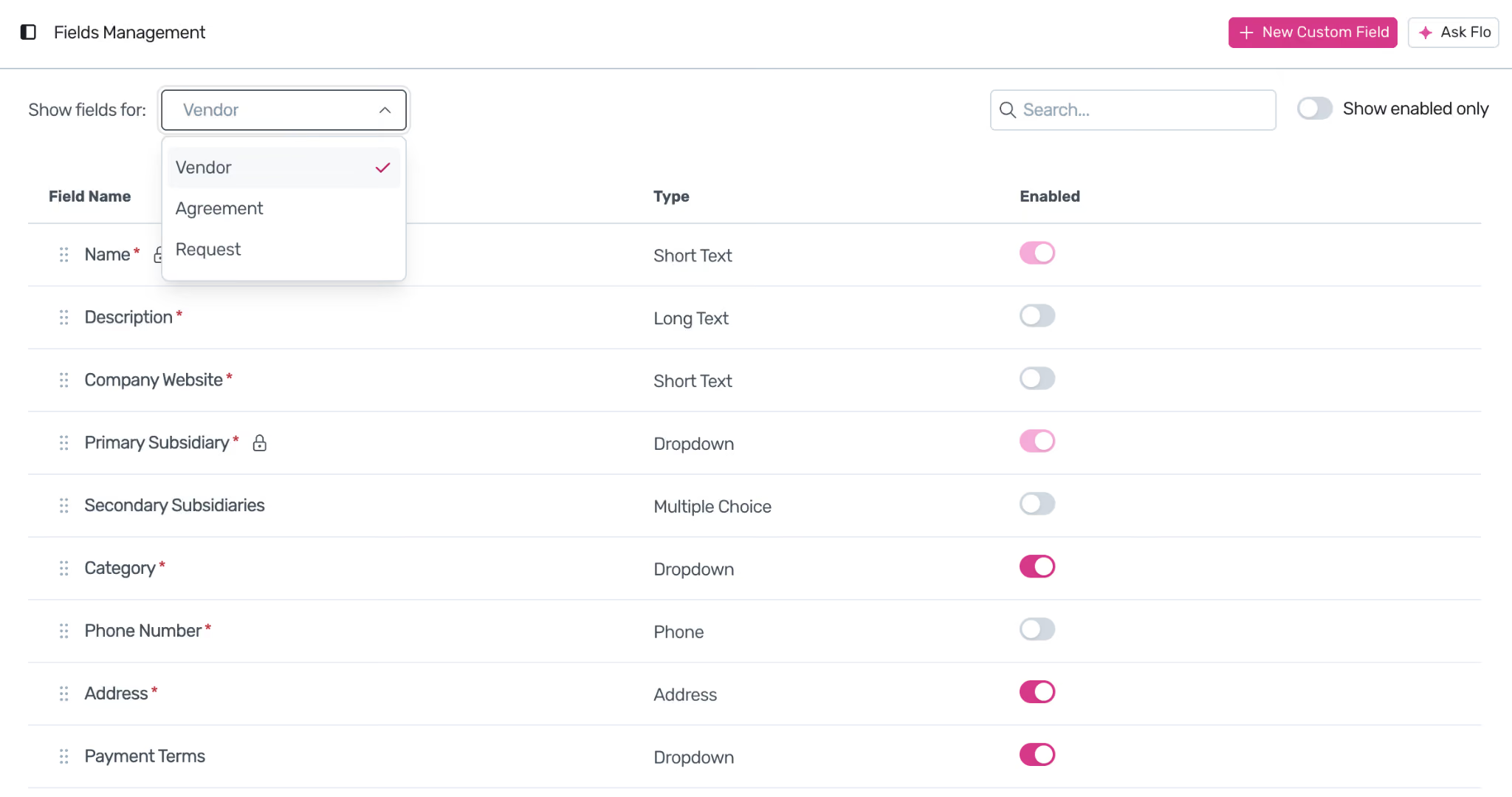
- Modular Field Management Dropdowns: Rather than managing multiple entity setups across separate windows, custom metadata configurations have been condensed into a sleek dropdown module. Administrators can choose specific settings targets (e.g., Request Listings or Agreement tab matrices) from a single screen layout.
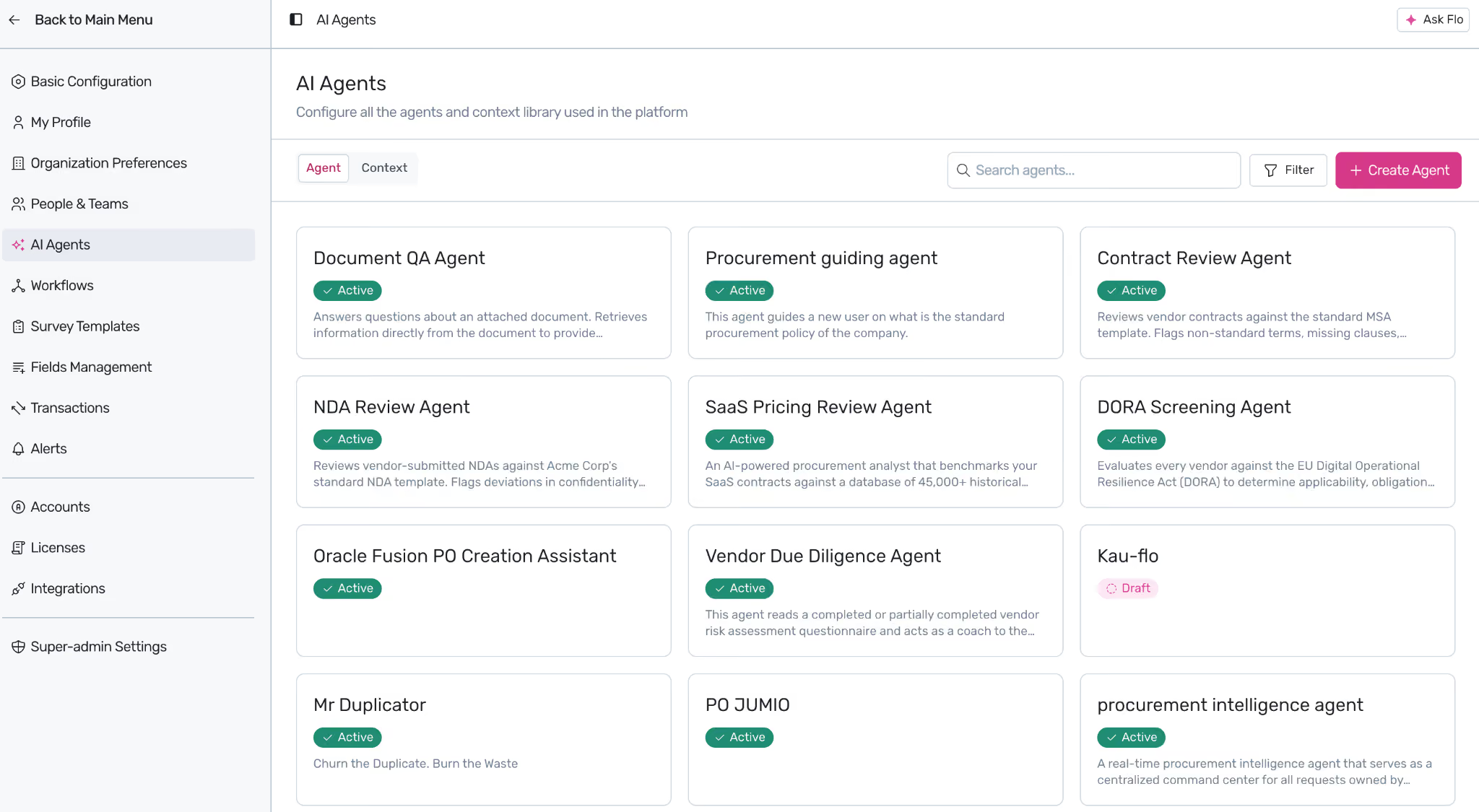
- Active AI Worker Directory: Nestled within your admin suite, the AI Agents panel provides direct control over autonomous micro-services. Administrators can audit and toggle specific agents (such as the Contract Review Agent or Vendor Due Diligence Agent) to manage continuous automated processing across all active incoming requests.
Testimonials

“Finance queries Flo AI and surfaces exactly what they need for reforecast: which renewals are approaching, what savings are in play, when contracts are closing. Live insights, on demand no back-and-forth, no delays”

Toral Patel,
VP Accounting

“With Spendflo, we finally have unified visibility. We can look in one portal and see all our spend, upcoming renewals, and how we’re actually using the licenses we’re paying for.“

Josh Rappoport,
VP Finance

“Spendflo AI triages intake and guides them through the right workflows. Centralize contracts, approvals, vendor data, and docs in one place. AI tracks usage, sentiment, and timelines automatically.”

Scott Stibich,
Senior Accountant.