
.avif)


An accounts payable workflow is the defined sequence of steps a company follows to move an invoice from receipt to payment: capturing it, verifying it, routing it for approval, paying it, and recording it. It's the operational blueprint underneath every invoice, not just a general description of what AP does.
What is an accounts payable workflow?
An accounts payable workflow is the specific, repeatable path an invoice takes through a company's systems and people before it becomes a completed payment. It's distinct from AP as a general function; a workflow is the mechanical sequence itself, the actual route an invoice travels.
Every company has some version of this workflow, whether or not it's ever been written down. In a small business, it might live entirely in one person's head: check the invoice, ask a manager if it looks right, pay it.
In a larger company, it's usually a documented, systemized path with defined handoffs between AP, procurement, and whoever holds spending authority at each dollar threshold. The workflow is what makes AP predictable rather than improvised.
This is also why "workflow" and "management" aren't quite the same question. Accounts payable management is the broader function, its goals, its people, its reporting. The workflow is the specific mechanism that function runs on. For the broader picture of the function itself, see our guide to accounts payable management.
What are the steps in the accounts payable workflow?
The accounts payable workflow runs through six practical steps: invoice receipt, data capture and verification, matching, approval routing, payment execution, and recordkeeping.
Competitors describe this anywhere from four steps to nine, depending on how granular they get, there's no single correct count, just different levels of detail. The accounts payable workflow diagram below shows how these six steps connect in sequence.
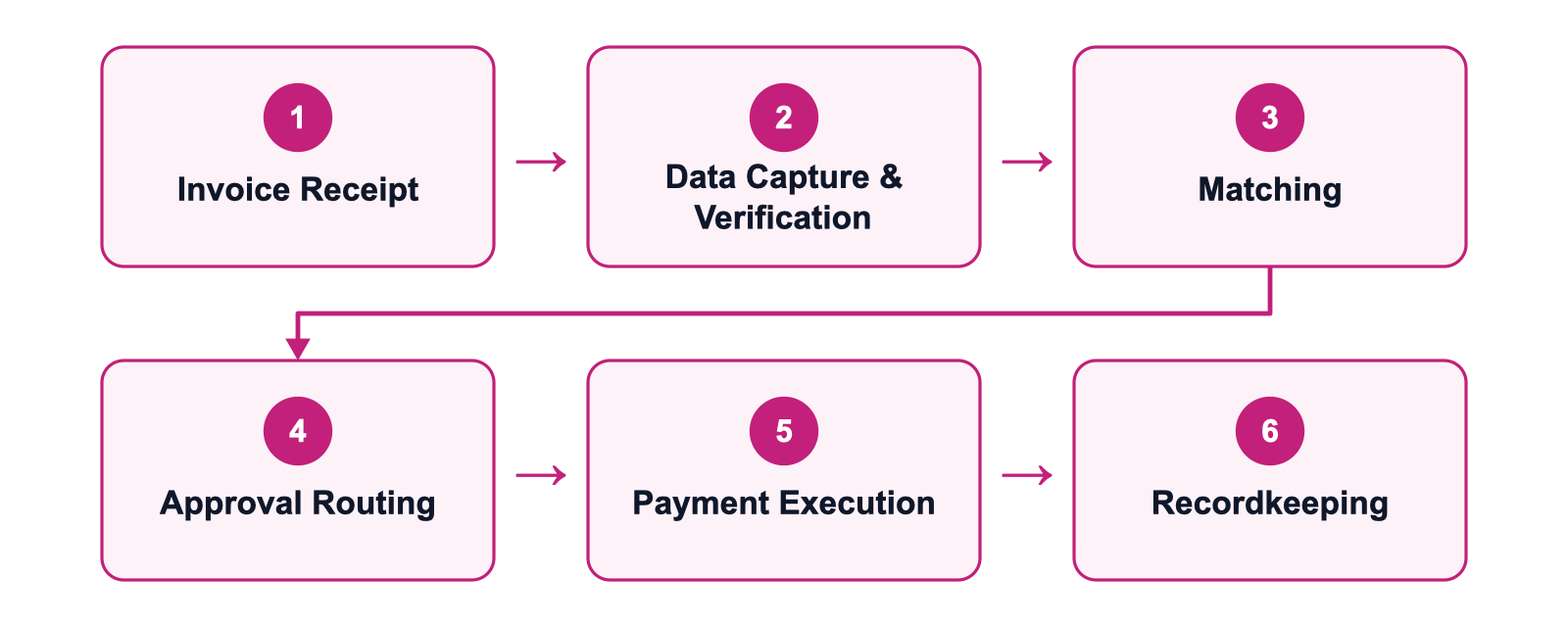
- Invoice receipt: the invoice arrives, by email, vendor portal, EDI, or paper scanned in, and enters the AP system.
- Data capture and verification: the invoice's details, vendor, amount, line items, get extracted and checked for basic accuracy.
- Matching: the invoice is compared against the purchase order and, where one exists, the goods receipt, the standard is 3-way matching, confirming what was ordered, what arrived, and what's being billed all agree.
- Approval routing: the invoice goes to whoever holds spending authority for that amount or category.
- Payment execution: the payment runs on the agreed terms, by check, ACH, or card, depending on what the vendor accepts.
- Recordkeeping: the transaction posts to the general ledger, closing the loop for reporting and audit purposes.
For the full mechanics of the matching step specifically, our 3-way matching guide covers the process, a worked example, and the journal entries involved.
What does the approval workflow look like?
The approval workflow is the part of the sequence where a human, not a system, decides whether an invoice is legitimate enough to pay, and it's usually the single biggest source of delay in the entire process.
- Tiered by dollar amount: a routine expense might need one approver, while a large capital purchase might route through two or three people in sequence.
- Enforces segregation of duties: no single person can both originate and approve a payment. That structural separation is what makes an approval workflow function as a control, not just a checkpoint.
- Exception handling is a sub-workflow of its own: when an invoice doesn't cleanly match its purchase order, it becomes an exception, and someone has to investigate the mismatch, decide whether it's a legitimate discrepancy or a real problem, and either clear it or escalate it.
- Tier count is the real design choice: too few tiers and high-risk payments get rubber-stamped by someone without full context, too many and routine invoices sit for days waiting on a signature from someone who was never going to catch anything the tier below them would have missed.
- The Controller usually owns this decision: not the AP manager alone, matching approval authority to actual risk rather than adding more steps for their own sake.
Where do accounts payable workflows typically break down?
Accounts payable workflows most commonly break down at three points: manual data entry, approval bottlenecks, and unresolved exceptions, and notably, the payment step itself is rarely where things actually go wrong.
- Manual data entry: invoices arrive in inconsistent formats, and someone retyping vendor names, amounts, and line items by hand is both slow and the single biggest source of the errors that trigger a mismatch later in the workflow.
- Approval bottlenecks: an approver who's traveling, on leave, or simply slow to respond stalls every invoice waiting behind them, even ones that would have cleared instantly.
- Unresolved exceptions: an invoice that doesn't match its PO doesn't process itself. It sits until someone has time to investigate, and in a busy AP team, that "someone has time" moment can take a while to arrive.
These three bottlenecks compound. A data entry error creates a false exception, the exception sits waiting for an approver who's also the bottleneck for routine approvals, and an invoice that should have taken two days takes two weeks.
Fixing any one of the three helps, but fixing all three is what actually changes how the workflow performs.
How do you build a paperless AP workflow?
A paperless AP workflow replaces physical invoices and manual routing with digital capture and electronic approval, and it solves a real problem, but it's worth being clear about what it does and doesn't fix on its own.
- Invoice intake: shift vendors toward email or a vendor portal instead of postal mail, and scan anything that still arrives on paper at the point of receipt rather than letting it accumulate.
- Digital storage: invoices become searchable, and multiple people can access the same document simultaneously instead of passing a physical folder around.
- Electronic approval: routing invoices through email or a dedicated system rather than a physical sign-off is what actually removes the paper trail from the approval step itself.
What paperless doesn't automatically fix is a broken approval chain, a digital invoice can sit unread in someone's inbox exactly as long as a paper one sat on their desk. The two problems are separate and need to be solved together:
How does automation change the AP workflow?
Automation changes the AP workflow by removing manual work from data capture, matching, and routing, and at its most complete, it enables straight-through processing: an invoice that clears every step with no human touch at all.
For a finance operations team, this shows up concretely at each step. Data capture uses OCR and AI to extract invoice details instead of manual typing. Matching runs automatically against the PO and goods receipt, with only genuine mismatches surfacing as exceptions for a person to review.
Approval routing follows pre-set rules, so an invoice moves to the right approver immediately instead of waiting for someone to notice it. Recordkeeping posts directly to the general ledger without a separate manual entry step.
Straight-through processing is the ceiling of what automation can do here, but it's not the floor, most companies land somewhere in between, with routine, low-risk invoices moving through untouched while anything unusual still gets a human look.
That's a feature of the design, not a limitation: full automation with no human checkpoint anywhere is a control gap, not a goal to chase blindly. For a deeper look at the automation mechanics themselves, see our accounts payable automation guide.
What to look for in AP workflow software
AP workflow software should handle capture, matching, and approval routing without manual data entry, connect cleanly to the company's existing ERP, and give both AP staff and finance leadership visibility into where every invoice actually stands. Not every workflow solutions option on the market covers all three well, some are strong on capture and weak on routing, or the reverse.
- ERP-connected workflow: the software should sync with the company's existing ERP or accounting system rather than operating as a disconnected side tool that needs manual reconciliation later.
- Configurable approval routing: approval tiers and thresholds should be something an AP manager can set and adjust directly, not something that requires a support ticket to change.
- Real exception handling, not just flagging: the system should help resolve a mismatch, surfacing likely causes and next steps, not just mark an invoice as "exception" and leave a person to start from scratch.
- Visibility for both roles: an AP manager needs operational detail on individual invoices; a CFO or finance operations lead needs trend-level visibility into how the workflow is performing overall. Good software gives both without forcing either to dig through the other's view.
For a full breakdown of what separates strong options here, see our guide to the best invoice processing software.
How Flo supports the accounts payable workflow
Flo, Spendflo's AI agent, runs the AP workflow end to end: capturing invoice data, matching against POs and goods receipts, and routing approvals based on the thresholds a company already uses. Routine, low-risk invoices move through with minimal manual touch, while anything genuinely unusual surfaces as a clear exception instead of a mystery.
For approval routing specifically, Flo lets an AP manager configure tiers directly without a support request, and every action, match, approval, override, is logged automatically, so the audit trail exists without extra manual work. Learn more on our accounts payable page.
Frequently asked questions about accounts payable workflow
1. What is a workflow in accounts payable?
A workflow in accounts payable is the specific, repeatable sequence an invoice moves through, receipt, verification, matching, approval, payment, and recordkeeping, rather than a general description of what the AP function does.
2. What are the 4 steps of the accounts payable workflow?
The simplest four-step version is invoice receipt, verification and matching, approval, and payment. Many breakdowns split these further, our six-step version separates data capture from matching and adds recordkeeping as its own step.
3. What's the difference between an AP workflow and AP automation?
The workflow is the sequence of steps itself. Automation is the technology that removes manual work from those same steps, they describe the same process from two different angles, structure versus execution.
4. How do you fix a broken approval workflow?
Start by mapping where invoices actually stall, usually a specific approver or a specific dollar tier, then match approval authority to real risk instead of adding more sign-offs. Configurable, rule-based routing removes the dependency on any one person's availability.
5. Does going paperless automate the AP workflow?
No. Paperless removes physical documents and manual filing, but an approval that sits unread in an inbox is just as slow digitally as it was on paper. Automation and paperless solve different problems and work best together.
6. What is straight-through processing in accounts payable?
Straight-through processing is when an invoice clears every workflow step, capture, matching, approval, payment, with no manual intervention at all. It's usually reserved for routine, low-risk invoices, with anything unusual still routed to a person.
7. How is the AP workflow different from the procure-to-pay workflow?
Procure-to-pay includes what happens before AP ever sees an invoice: requisitioning, sourcing, and issuing the purchase order. The AP workflow is the back half of that cycle, starting once an invoice actually arrives.


-compressed.avif)











.avif)
.avif)