

.avif)


According to a Deloitte survey, nearly 40% of organizations struggle with untracked purchases and invoice errors that drive unnecessary costs. It’s a common issue across teams of all sizes, and one that often goes unnoticed until budgets start to slip.
That’s why understanding the role of purchase orders is so important. Far from being routine paperwork, they bring structure, accountability and clarity to every transaction. Companies with organized PO systems cut maverick spending by up to 35% and improve invoice accuracy by 45%, proving that better procurement starts with a solid foundation.
What is a Purchase Order?
purchase order (PO) is a formal document a buyer sends to a vendor to request goods or services. It lists key details such as item names, quantities, and prices. Once accepted by the vendor, it becomes a binding contract that helps both sides track orders and maintain accurate financial records.
Importance of Purchase Order
As a business owner, the last thing you need is more paperwork. Not using the right purchase order can have implications for your business.
Purchase orders are more prominent in keeping an accurate and detailed financial record. They might seem an unnecessary extra step, but knowing how to use them in the right way can benefit your business in the long term.
If you're a small business owner or managing procurement for a large enterprise, the correct purchase order system can help make a big difference.
Keep reading to know more about the importance of having purchase orders in place for your business or company -
1. Offering Legal Protection
Purchase orders are legally binding documents regarding the prices and quantity of goods in your order, protecting you and the vendor or supplier. It's advisable to have a legal record of precisely what you ordered; a purchase order helps initiate that.
Each document also includes a unique purchase order number, which makes tracking and referencing easier during disputes or audits. This will also safeguard you against mishaps, such as sudden price surging, the wrong type of items or quantity received, or being charged an incorrect amount.
2. Boost for Inventory Management
Buying goods is the first step in securing inventory. When you have a purchase order system in place, inventory management is improved in the long run. It helps keep track of what goods should be arriving, and then you can match them with the invoices to ensure the details such as types of goods and quantities.
This will keep you informed about the status of your incoming inventory and improve visibility across your supply chain. This will keep you informed about the status of your incoming inventory.
3. Saves Time
Creating a purchase order document is crucial as it saves you time in the long run. To begin with, a well-established purchase order system with several features eases down the entire ordering process. Once the system is up, the experience will be hassle-free.
A digital procurement system further enhances this process by automating repetitive tasks and reducing manual errors. Plus, after your orders arrive, you'll save time as you only have to check the invoice against the purchase order to ensure accuracy. The system makes everything you need readily available.
4. Avoid Any Mishaps
Purchase orders clearly mention a record of the goods and order details, protecting you from any kind of mishaps when ordering, such as someone getting a phone order wrong. You can always refer back to POs when there's any disagreement about the ordered goods. Having this type of documentation in place safeguards you against any goof-ups that might happen.
5. Budgeting Assistance
If you're handling a large project, purchase orders can help with budgeting. To generate the correct POs, you must be precise about the order quantities before the project starts. In addition to big projects, purchase orders also come in handy for daily purchases while running the business.
They’re also helpful for budgeting goals by providing records of purchases. They’re also helpful for budgeting goals by providing records of purchases and maintaining a clear purchase history for future planning. This way, you’ll always be prepared to plan for future budgets.
6. Identify Performance Issues
If the bulk of the goods are not focused where you would like, a quick look at purchase orders will provide essential insights about performance. By analyzing the details of purchase orders, you'll learn what is selling well and what is not. This data will also provide knowledge on production and other factors that might influence your business.
Key Components of a Purchase Order
A purchase order (PO) includes several essential details that make it a complete and legally binding document. These elements ensure both the buyer and seller understand the order, pricing, and delivery terms clearly, helping transactions run smoothly.
1. Buyer and Seller Information
- Buyer Details: Legal name, address, and contact information of the company making the purchase.
- Seller Details: Supplier’s name, address, and contact information for easy communication and invoicing.
2. Order and Item Details
- Purchase Order Number: A unique ID for tracking and reference.
- Order Date: When the PO was created or approved.
- Item Description: Clear details about the product or service, such as model, size, or color.
- Quantity: The number of items or units requested.
- Price: The agreed unit cost, including taxes, subtotals, and the total value of the order.
3. Delivery and Payment Information
- Delivery Date: When goods or services are expected to arrive.
- Shipping Address: The exact delivery location.
- Payment Terms: Agreed payment timelines (e.g., Net 30) and methods.
- Shipping Terms: Details on delivery methods and who covers shipping costs.
4. Other Conditions
- Terms and Conditions: Any additional clauses, such as warranties, returns, or liability terms.
- Authorization: Signatures or approvals from authorized team members confirming the order.
Purchase Order vs. Other Documents: A Clear Breakdown
Purchase orders often get mixed up with invoices, sales orders, and purchase requisitions. While they’re all part of the procurement process, each serves a unique purpose. Understanding these differences helps finance and procurement teams keep approvals, payments, and records in sync.
A) Purchase Order vs. Invoice
A purchase order is created by the buyer to request goods or services, while an invoice is sent by the seller to request payment after delivery. The two documents work together, the PO initiates the transaction, and the invoice closes it.
B) Purchase Order vs. Sales Order
A sales order is issued by the seller after receiving a PO, confirming that they can supply the requested items. Together, they ensure both sides agree on what’s being purchased and at what cost.
C) Purchase Order vs. Purchase Requisition
A purchase requisition comes before a PO. It’s an internal document employees use to request approval from their procurement or finance team. Once approved, a purchase order is created and sent to the vendor.
To know more about the differences between Purchase Requisition & Purchase Order, Read - Understanding Purchase Requisition (PR) Vs Purchase Order (PO).
What are the Different Types of Purchase Orders?
There are four main types of POs that businesses use based on different purposes and circumstances.
1. Standard Purchase Orders
These are the most common type of purchase order. They are created when a company is required to buy goods once. A standard purchase order will include the necessary information, such as payment and delivery details. These can be the best options when you are conducting one-off purchases and have fixed delivery dates and payment terms.
2. Planned Purchase Orders
Similar to standard purchase orders, these are typically not used for one-time transactions. Instead, they cover the entire scope of an ongoing transaction, with payments and deliveries occurring in installments. For example, a company might plan to acquire 50 new Bluetooth speakers over six months but will issue specific orders for ten at a time as needed.
This systematic approach allows businesses to strategically plan their procurement activities and manage their cash flow by spreading out payments instead of making a single large upfront purchase.
3. Blanket Purchase Orders
Blanket purchase orders are generally used for recurring purchases. They allow companies to request an indefinite quantity of a specific good from a vendor over an unspecified period. This arrangement includes an agreement to procure goods or services from the vendor, with detailed specifications to be decided later.
4. Contract Purchase Orders
Great for complex projects or ongoing services. They are legally binding agreements that outline the terms, conditions, and detailed scope of work expected from your vendors. By clearly defining expectations and deliverables upfront, contract POs help ensure compliance, minimize risks, and promote strong, long-lasting relationships with your suppliers.
Why Every Business Needs Purchase Orders
Purchase orders (POs) are more than just routine paperwork - they are essential tools that keep your procurement process running smoothly and transparently. No matter the size of your business, implementing a structured PO system helps ensure every purchase is tracked, approved, and documented properly.
1. Legal and Financial Protection
A purchase order acts as a legally binding contract between the buyer and the vendor. It outlines the agreed-upon terms - what’s being bought, in what quantity, at what price, and by when it should be delivered.
Clear delivery schedules included in the PO help prevent delays and align expectations between buyers and vendors. This documentation helps resolve disputes over pricing, deliveries, or payments, providing a layer of legal protection for both parties.
2. Better Budget Control
Without purchase orders, it's easy for expenses to spiral out of control. A PO system enforces internal approvals, ensuring that purchases align with budgets and business needs. This level of oversight is especially useful during audits or when reviewing historical spend.
3. Stronger Inventory Management
POs make it easier to track what goods are expected and when. This helps businesses manage inventory more effectively by preventing over-ordering, stockouts, or duplicate purchases. When paired with invoice matching, POs also reduce errors in receiving and billing. When integrated with an ERP system, POs provide a unified view of inventory levels, procurement data, and financials.
4. Improved Vendor Relationships
Vendors appreciate clarity. A well-structured PO sets expectations upfront, reducing the risk of misunderstandings or delivery issues. It also allows your procurement and finance teams to build a reliable history of vendor performance, which can lead to better terms in future negotiations.
5. Operational Efficiency and Accountability
With a PO system in place, every request must go through an established workflow. This builds accountability into the purchasing process and makes it easier to identify inefficiencies or areas that need improvement. Many businesses now use automated systems to streamline PO creation, approval, and tracking reducing manual work and processing time.
In short, purchase orders bring structure, control, and transparency to a chaotic process - making them indispensable for modern procurement teams.
Common Purchase Order Pitfalls to Avoid
Even the most organized procurement teams can run into problems if their purchase order process isn’t consistent. Small mistakes, from missing details to poor communication, can lead to costly errors, delayed deliveries, or strained vendor relationships. Understanding these common purchase order pitfalls and knowing how to manage them can make your procurement process far smoother.
1. Missing or Incorrect PO Details
Pitfall: A purchase order with wrong product codes, quantities, or pricing creates confusion for both the supplier and the finance team. These errors often cause invoice mismatches, shipment delays, and unnecessary back-and-forth between departments.
How to Avoid: Use a standardized purchase order template or an automated system that validates each field before submission. Always include complete item descriptions, pricing, taxes, delivery terms, and approvals. A quick final review before sending the PO can prevent days of rework later.
2. Lack of a Standardized Approval Workflow
Pitfall: When purchase orders rely on manual approvals via email or chat, they often sit idle for days or get lost in the process. This creates uncertainty around budgets and slows down essential purchases.
How to Avoid: Establish a clear, automated approval workflow that routes POs to the right stakeholders instantly. Cloud-based procurement tools can provide visibility into who approved what, when, and why, making it easier to manage accountability and maintain audit trails.
3. Poor Vendor Communication
Pitfall: When vendors aren’t kept in the loop, even a well-prepared PO can fall apart. Misunderstandings about delivery dates, quantities, or payment terms lead to shipment delays or inaccurate invoicing.
How to Avoid: Confirm every purchase order with the vendor once it’s issued. Keep communication lines open through shared procurement portals or vendor dashboards. Clear documentation ensures everyone is aligned on expectations before an order moves forward.
4. Limited Spend Visibility
Pitfall: Without visibility into how purchase orders impact budgets, teams may overcommit funds or duplicate purchases. Finance leaders then lose track of real-time cash flow and actual versus planned spending.
How to Avoid: Integrate purchase order data with your spend management or ERP system. Real-time dashboards give finance and procurement teams a single view of all active POs, approvals, and spend categories. This helps identify bottlenecks and manage budgets more effectively.
5. Failing to Review and Audit POs Regularly
Pitfall: Once purchase orders are approved and sent, they’re often forgotten. Over time, this can result in duplicate orders, missed renewals, or payments for outdated pricing terms.
How to Avoid: Schedule regular audits of open and closed POs. Reviewing historical data helps identify suppliers with recurring issues, missed savings opportunities, and inefficiencies in the approval process. This step strengthens procurement performance and supports better vendor relationships.
Benefits of Purchase Orders
Purchase orders offer numerous advantages for both buyers and sellers. They streamline procurement, improve budget management, and foster better communication overall.
Let's take a quick look at the key benefits of utilizing purchase orders -
1. Seller Performance Tracking
The Purchase order creates a valuable audit trail by documenting intricate details such as order date, promised delivery date, ordered quantity and price, received quantity and date, and invoiced quantity and price. By analyzing this data, you can gain insights into which vendors consistently deliver on time, within budget, and without any human error. This enables you to recognize the top-performing suppliers and make informed decisions about future formal contracts for your business.
2. Serves As Significant and Formal Documentation
The purchase order is important because it provides a written and legal document recording the details of the entire purchase transaction. This ensures clear communication of expectations and minimizes the potential for misunderstandings or disputes between your business and the seller.
3. Preventing Duplicate Orders
As your business expands and manual purchase requests multiply, tracking who ordered what, when, and from whom can become increasingly difficult. Accidental duplicate orders can also occur, adding to the confusion. Implementing a consistent purchase order system for all purchases helps mitigate duplicate spending. By creating a searchable digital record of every transaction, POs provide a comprehensive view of your spending, making errors less likely and ensuring better control over your procurement process.
How does a Purchase Order work?
A purchase order (PO) moves through several structured steps from creation to payment. It begins with a buyer’s request and ends once the supplier delivers the goods or services and receives payment. Each step ensures accuracy, accountability, and transparency in the procurement process.
Step 1: Create and Approve the Purchase Order
The process starts after an internal purchase requisition is approved. The purchasing team generates a purchase order that includes details such as a unique PO number, product descriptions, quantities, and pricing.
In some organizations, a formal requisition approval is mandatory before creating the PO, while others allow a direct creation process. Either way, once approved, the PO becomes an official document authorizing the purchase.
Step 2: Send the PO and Get Supplier Confirmation
The buyer sends the purchase order to the supplier for review. The supplier checks the details and can either accept or request changes.
If everything looks correct, the supplier confirms acceptance, at this point, the PO becomes a legally binding agreement between both parties.
Step 3: Supplier Delivers Goods and Issues Invoice
After accepting the PO, the supplier delivers the agreed goods or services and sends an invoice. The invoice lists payment terms, due dates, and references the PO number. Depending on the agreement, payment may be due before, during, or after delivery.
Step 4: Match the PO, Invoice, and Receipt
Once the goods or services are received, the buyer compares the PO, the supplier’s invoice, and the receipt details. This step, known as three-way matching, verifies that quantities, pricing, and terms are consistent. Any discrepancies are flagged and corrected before payment is processed.
Step 5: Approve and Process the Payment
After successful matching and verification, the invoice moves through internal approval for payment. The accounts payable team releases payment according to the agreed terms.
If the PO is fully fulfilled, it’s marked as closed. If partially fulfilled, it remains open until all items are delivered and paid for.
Steps in the Purchase Order Process
A well-defined purchase order (PO) process helps ensure that business purchases are accurate, approved, and documented from start to finish. Below is a detailed look at each step involved in a typical PO workflow, from identifying needs to maintaining records.
1. Identify the Need for Goods or Services
The process begins when a department or team recognizes a requirement for a product or service. This could stem from low inventory levels, project demands, or maintenance needs. Clearly defining the requirement at this stage helps reduce unnecessary purchases and ensures accurate procurement.
2. Create a Purchase Requisition
Once the need is confirmed, a purchase requisition is generated. This is an internal document used to request the purchase of specific items. It includes key details such as product specifications, quantity, purpose, and estimated cost. This step acts as an initial checkpoint before committing to spend.
3. Approve the Purchase Requisition
The requisition is then reviewed by the appropriate stakeholders - often department heads, budget owners, or procurement managers. Approval ensures that the request aligns with business priorities and available budgets. Some organizations use multi-level approvals depending on the value or nature of the purchase.
4. Select a Vendor and Negotiate Terms
Once approved, the procurement team shortlists vendors based on price, delivery time, quality, and past performance. Once approved, the procurement team shortlists vendors based on price, lead times, delivery performance, and overall quality. Terms such as payment cycles, delivery timelines, discounts, and service levels are negotiated to get the best value. For recurring orders, businesses may opt for a blanket PO arrangement, allowing multiple purchases under one agreement.
5. Issue the Purchase Order
After finalizing the vendor and terms, a formal purchase order is created and sent to the vendor. Most companies use a standardized purchase order template to ensure consistency in the information captured across every transaction. This document includes PO number, buyer and supplier details, items ordered, pricing, delivery schedule, payment terms, and applicable taxes. It serves as a legally binding contract once accepted.
6. Vendor Acknowledgement
The vendor reviews the PO and confirms acceptance. Any changes, such as shipping delays or product availability issues, are communicated at this stage. Acknowledgement helps avoid surprises and sets mutual expectations for the delivery.
7. Delivery and Goods Receipt
The vendor fulfills the order and delivers the goods or services. Upon receipt, the buyer inspects the delivery for quality, quantity, and conformity to the PO. If everything matches, a goods receipt note (GRN) is issued and logged into the system.
8. Three-Way Matching (PO, Invoice, and GRN)
This crucial step ensures accuracy in payment. The PO, invoice from the vendor, and GRN are cross-verified. Any mismatch - like incorrect quantity or overbilling - is flagged and resolved before payment processing. This step reduces fraud and overpayments.
9. Payment Processing
Once the three-way match is successful, the invoice is approved for payment. Payment is made as per the agreed terms - often 30, 45, or 60 days after delivery. Various payment methods - such as bank transfers, corporate cards, or net terms - may be used depending on vendor agreements.
Timely payments help maintain good supplier relationships and may qualify you for early-payment discounts.
10. Record Maintenance and PO Closure
All relevant documents - the PO, invoice, GRN, and payment proof - are archived digitally or physically for audit and compliance purposes. The PO is marked as closed, signaling the end of the cycle. These records are also useful for budgeting, forecasting, and supplier evaluations.
By following each of these steps, businesses can bring transparency, accuracy, and control to their procurement process. A structured PO process not only streamlines operations but also reduces risk and ensures accountability at every stage.
Process To Track A Traditional Purchase Order
Before automation and procurement software became standard, companies relied on manual purchase order tracking. This approach was often time-consuming and error-prone, depending heavily on paper-based systems, emails, and manual communication.
Let’s look at how a traditional process typically worked, using the example of a department ordering more stationery supplies.
Step 1: Request and Budget Check
The purchasing department identifies a need for more stationery and contacts the department requesting the items. Before moving forward, they confirm whether the purchase fits within the department’s allocated budget. This initial check helps prevent overspending and ensures financial accountability.
Step 2: Create the Purchase Order
Once the request is approved, the purchasing department manually prepares a purchase order for the stationery supplier. This PO includes details such as product quantities, descriptions, pricing, and delivery dates.
Step 3: Send the PO to the Supplier
The purchasing team then sends the PO to the supplier, traditionally by postal mail, fax, or email. Because this process is manual, it relies on the supplier to acknowledge receipt and begin processing the order, which can sometimes lead to delays or miscommunication.
Step 4: Follow Up for Order Status
After sending the PO, the department may contact the supplier directly, providing the PO number to request a delivery update. This step often involves phone calls or back-and-forth emails, adding more time and effort to track the status of the order.
Issues with the Traditional Way Of Purchase Order
Before automation, most purchase orders were created, tracked, and stored manually - using paper forms, spreadsheets, or email chains. This made the entire process time-consuming and error-prone. Paper-based systems lacked standardization, and documents were often misplaced, delayed, or duplicated.
Tracking and managing POs involved back-and-forth communication, delayed approvals, and scattered documentation. Finance, procurement, and operations teams often worked in silos, lacking a single source of truth. The result? Missed deliveries, duplicate orders, and frequent invoice mismatches.
Here’s a quick comparison of manual vs. automated processes:
As purchasing becomes more strategic, the traditional way simply can't keep up. The next section explores how automation solves these challenges.
Best Practices for Managing Purchase Orders
Strong purchase order management is the foundation of a smooth procurement process. It ensures that spending stays within budget, approvals are transparent, and every order is tracked from start to finish. Following a few proven purchase order best practices can help finance and procurement teams save time and reduce costly mistakes.
1. Standardize Your Purchase Order Process
Consistency is key. Establish a unified workflow across departments for creating, approving, and tracking POs. A standardized process ensures that every purchase follows the same steps, from request to payment, reducing confusion and manual errors.
Document your workflow and share it with all stakeholders so everyone understands their role in the approval chain.
2. Use Clear, Complete, and Accurate Information
Incomplete or inaccurate POs often cause disputes and payment delays. Each PO should include item descriptions, quantities, delivery dates, and total costs.
Set up mandatory fields in your PO system to prevent missing data. Double-check pricing and terms before sending to suppliers to maintain transparency and trust.
3. Implement Automated Approval Workflows
Manual approvals through email or spreadsheets can slow down operations. Modern procurement tools make it easy to automate routing, approval notifications, and status tracking.
Automation not only speeds up the process but also ensures that purchase orders are reviewed by the right people at the right time, improving compliance and accountability.
4. Maintain Real-Time Visibility Into Spend
Without clear visibility into active and pending POs, it’s easy to overspend or duplicate orders. Integrate your purchase order system with accounting or spend management software to monitor budgets in real time.
Dashboards and analytics provide instant insights into how much has been committed, paid, and saved, helping finance teams make better decisions.
5. Strengthen Supplier Communication
Good communication keeps the purchase order process efficient. Always share POs promptly with suppliers and confirm they’ve been received. Maintain a record of delivery timelines, invoice numbers, and follow-ups to avoid confusion later.
Using a shared vendor portal or dashboard helps both sides stay aligned on updates and expected deliveries.
6. Review and Audit Regularly
Regular audits help identify bottlenecks, outdated pricing, and areas for improvement. Track metrics such as approval times, PO cycle durations, and error rates to assess performance.
Encourage feedback from finance, procurement, and vendor teams to continuously refine your process.
Examples of Purchase Order
A typical purchase order acts as a blueprint for a business transaction, containing key details agreed upon by both the buyer and seller. It usually includes the buyer's company information, a unique PO number for easy reference, and a detailed list of the items or services being purchased, including quantities, individual prices, and total costs.
The PO also specifies the delivery address, anticipated delivery date, and any relevant terms and conditions. Payment details terms, such as when the invoice is due, are also outlined. Finally, the document features designated spaces for authorized signatures from both parties, indicating formal agreement to the purchase terms.
This standardized format ensures clarity and transparency, providing a comprehensive overview of the transaction for everyone involved in the procurement process.
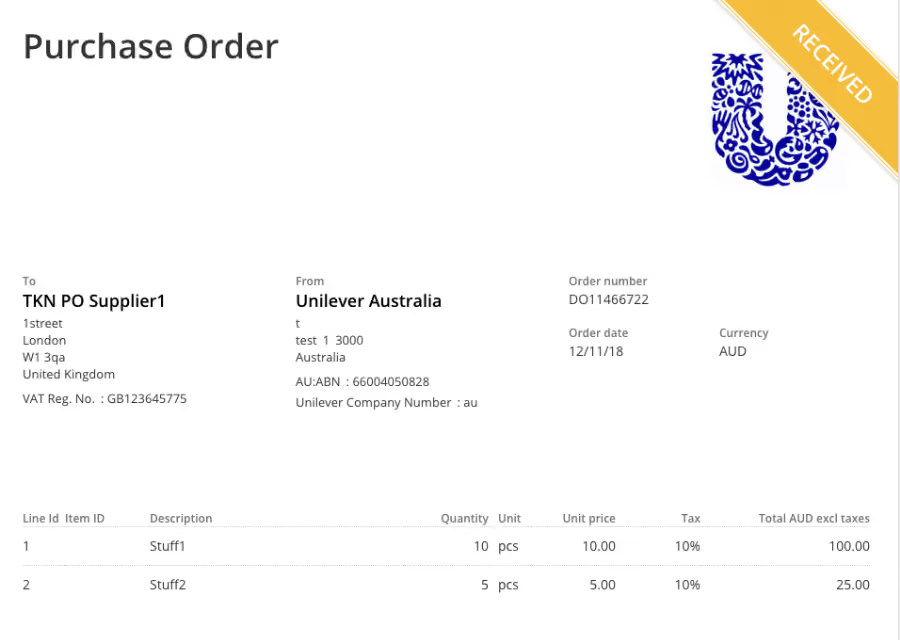
Here’s an example of a purchase order from Unilever Australia to TKN PO Supplier 1 in London. The order details a request for 10 pieces of "Stuff1" and 5 pieces of "Stuff2" at unit prices of 10.00 AUD and 5.00 AUD, respectively, plus 10% tax. The total cost before taxes is 125.00 AUD, and the order was placed on 12/11/18.
Transition to Automated Purchase Order Tracking
With advancements in procurement technology, the PO process has become faster, smarter, and more transparent. Automated purchase order tracking allows teams to monitor every step of the order lifecycle - from requisition to delivery - on a single digital platform.
Modern tools integrate directly with supplier systems and inventory management software, enabling real-time visibility into order status and shipment movement. Alerts and notifications can be set up to inform stakeholders of approvals, delays, or changes - reducing the need for manual follow-ups.
Automated workflows streamline approvals, improve data accuracy, and ensure that POs are created, updated, and closed on time. They also enable centralized document storage, making audits and historical tracking much easier. Most importantly, automation empowers procurement and finance teams to make faster, more informed decisions - ultimately driving greater efficiency and cost savings.
Here’s a quick comparison of how purchase order tracking works in a manual vs. automated setup:
Spend Smarter, Automate Your Purchase Orders with Spendflo
For most growing companies, managing purchase orders manually can feel like an endless cycle of approvals, tracking emails, and missed deadlines. Every delayed order or mismatched invoice chips away at efficiency and budget control, often without anyone realizing the full cost until quarter-end.
When a mid-sized SaaS company partnered with Spendflo, they were facing similar challenges: scattered approvals, poor visibility into budgets, and frequent invoice errors. Within 60 days of switching to Spendflo’s automated purchase order system, they cut manual processing time by 40% and gained full visibility across all vendor spend.
Without automation, these challenges only grow, more suppliers, more invoices, and more complexity. That’s where Spendflo simplifies everything. Our AI-powered procurement platform helps you automate purchase orders, standardize workflows, and gain real-time visibility into every transaction.
- Simplify approval workflows for faster decision-making.
- Track budgets and purchase order status in real time.
- Integrate seamlessly with your finance and ERP systems for end-to-end visibility.
Don’t let outdated processes slow down your business. Start managing purchase orders smarter, with a system built to save you time, money, and stress.
Book a free demo with Spendflo today and see how easy procurement can be when it runs itself.
Frequently Asked Questions on Purchase Orders
How does a purchase order work?
A purchase order (PO) outlines the details of a transaction, specifying the list of items a buyer agrees to purchase, the agreed-upon price, delivery date, and payment terms.
How does a purchase order get paid?
A buyer initiates the process by creating a purchase order for a vendor to fulfill. The vendor then issues an invoice for the purchased items or services. Typically, the buyer pays upon receiving the invoice. However, in some cases, processing payment may occur after the shipment arrives, as per the agreement outlined in the purchase order.
What is a vendor invoice and its relationship to a purchase order?
A vendor invoice is a document sent by the seller to the buyer, usually accompanying the goods. It provides a detailed breakdown of costs for the list of items mentioned in the purchase order. The invoice should match the PO details to ensure accuracy and facilitate payment processing.
What is a goods receipt and how does it relate to an effective purchase order?
A goods receipt, also known as a packing slip, is a document detailing the contents of an order shipped by the seller. The buyer uses it to verify that all items listed on the PO are present in the shipment.
Can a purchase order be canceled?
Yes, a purchase order can be canceled after issuance, as long as the vendor still needs to be paid. The buyer responsible for issuing the PO would typically handle the cancellation request.


-compressed.avif)












.avif)
.avif)