




“Computation may someday be organized as a public utility,” predicted computer scientist John McCarthy in 1961. Six decades later, his vision is a reality: software now powers every function of modern business. The average mid-sized company relies on over 100 SaaS tools, and enterprise stacks can exceed 250 applications.
Yet, this abundance comes at a cost. When employees choose and buy tools independently, organizations face shadow IT, duplicate spend, and security blind spots. Finance and procurement leaders are left struggling to balance control with user satisfaction. In an era where every click and renewal impacts ROI, understanding user sentiment is no longer optional; it's essential for smarter SaaS buying and renewal decisions.
What is User Sentiment Analysis?
User sentiment analysis measures how employees feel about the software and tools they use daily. It goes beyond usage metrics to track satisfaction, frustration, and preferences using surveys, feedback, and behavior data. Unlike customer sentiment, it focuses on internal users to improve adoption and productivity.
Importance of User Sentiment Analysis
The two main parameters to consider when analyzing user sentiment are Satisfaction and Criticality.
Satisfaction provides insight into which tools your employees like or dislike. If an employee dislikes a tool they have been given, they are not likely to use it. Same goes for tools that don’t have the functionality they need as well.
For instance, if the engineering team doesn’t like Trello, they would either use a free version of something like Jira or Linear, or pay for it and reimburse later. Worst case, they would use something like a notebook or a Spreadsheet, affecting productivity significantly.
Criticality provides insight into tools that different teams need to perform their daily tasks effectively. Say, you have a subscription for an email management tool, but the marketing team does not send email campaigns at all, it is not critical to their work. This makes the expense wasteful.
Types and Techniques of Sentiment Analysis
There are several types of sentiment analysis, each offering a different level of detail and insight. Choosing the right one depends on what you want to understand, general opinions, emotional tone, or intent behind feedback.
1. Fine-Grained Sentiment Analysis
Fine-grained sentiment classifies opinions on a graded scale rather than a simple positive or negative. For example, it might categorize responses as very positive, positive, neutral, negative, or very negative.
This helps organizations understand not just whether employees like a software tool, but how strongly they feel about it.
2. Aspect-Based Sentiment Analysis
In aspect-based sentiment analysis, feedback is analyzed for specific product features or processes. Instead of assessing overall sentiment, it breaks it down by aspect such as usability, performance, or support experience.
For instance, users might love a platform’s interface but express frustration about slow response times. This level of detail helps teams target improvements effectively.
3. Emotional Detection
Emotional detection identifies the feelings expressed in text such as happiness, anger, frustration, or surprise.
This method helps uncover the emotional drivers behind feedback. For example, repeated frustration signals usability issues, while positive emotions show strong adoption and satisfaction.
4. Intent Analysis
Intent analysis goes beyond emotions to identify the purpose or motivation behind feedback like a user planning to renew, upgrade, or cancel a tool.
By tracking intent, organizations can act early to prevent churn and reinforce positive experiences.
Challenges in User Sentiment Analysis
While user sentiment analysis offers powerful insights, interpreting human emotion accurately isn’t always simple. Several limitations make this process complex and sometimes unreliable.
1. Sarcasm and Context Misinterpretation: Detecting sarcasm in sentiment analysis remains one of the toughest challenges. For example, a comment like “Great, another software update that broke everything” may sound positive on the surface but expresses clear frustration. AI models can misread tone or irony, leading to false positives in sentiment classification.
2. Ambiguous and Neutral Language: Employees often use neutral or vague language in feedback phrases like “It’s fine” or “Could be better” are open to interpretation. This makes it difficult to assign a clear sentiment score and can distort overall analysis accuracy.
3. Cultural and Linguistic Nuances: Sentiment can vary widely by culture, region, or phrasing style. What sounds polite or positive in one language might seem blunt or negative in another. Without localization awareness, models risk misjudging sentiment patterns.
4. Data Quality and Bias: Sentiment models rely heavily on training data. If that data is unbalanced, outdated, or biased, it can skew results. For example, over-representation of certain phrases or demographics may limit the model’s ability to interpret new or diverse feedback accurately. Maintaining high-quality, unbiased datasets is critical for consistent results.
5. Dynamic Human Expression: Emotions evolve over time and context. A tool an employee dislikes today might become essential once they learn its benefits. Capturing this fluid sentiment requires ongoing analysis and human validation.
How to Perform User Sentiment Analysis in 5 Steps
The user sentiment analysis process helps organizations turn feedback into actionable insights. Here’s how to analyze sentiment in five structured steps:
1. Collect Data from Multiple Sources: Start by gathering data from where users share opinions, employee surveys, internal chats, app reviews, and social media platforms. The broader the data source, the more accurate your understanding of user attitudes.
For internal software tools, focus on usage feedback and in-app comments to capture authentic sentiment.
2. Clean and Prepare the Data: Before analysis, data needs to be cleaned and standardized. Remove duplicate responses, irrelevant text, and spam entries. Preprocessing may also include tokenization (breaking text into words), stop-word removal, and normalization to ensure consistent input for the analysis model.
3. Apply Sentiment Analysis Software: Use AI-based sentiment analysis tools to classify opinions as positive, negative, or neutral. Modern tools can detect emotion, intent, and context to refine accuracy. For enterprise teams, integrating these tools with existing analytics or feedback systems helps scale insights efficiently.
4. Visualize Insights for Decision-Making: Once analysis is complete, represent findings through dashboards, heat maps, or sentiment trend graphs. Visualization helps identify patterns like recurring frustrations or improvements in satisfaction and makes insights easier for leadership teams to act on.
5. Act on the Findings: Finally, use these insights to drive improvement. For example, enhance software adoption, simplify workflows, or improve support experience. Closing the loop between analysis and action ensures that sentiment tracking leads to measurable results.
Applications of User Sentiment Analysis
The value of user sentiment analysis extends far beyond measuring satisfaction. It helps teams make smarter product, design, and business decisions based on how users truly feel.
Here are some of the most impactful sentiment analysis applications across functions:
1. Product Feedback and Development: Sentiment analysis helps teams sift through product reviews, surveys, and feedback to understand what users love and what frustrates them. By identifying recurring themes, product managers can prioritize feature updates, fix issues faster, and build solutions that align with user expectations.
2. UX and Design Optimization: In UX design, analyzing user sentiment highlights how people feel when navigating a platform or application. Insights from usability tests, support tickets, or internal chat feedback help designers refine interfaces, simplify workflows, and boost overall satisfaction.
3. Customer Service and Support: Sentiment insights can guide customer feedback analysis in support interactions revealing whether users are satisfied with responses or growing frustrated. This enables teams to personalize communication, improve response quality, and proactively address pain points before they escalate.
4. Brand Monitoring and Reputation Management: Beyond internal tools, sentiment analysis is also vital for brand monitoring. It tracks how customers discuss a company or product across review sites and social media. Understanding shifts in tone helps marketing and PR teams manage brand perception and act quickly to protect reputation.
Choosing the Right User Sentiment Analysis Tool
Selecting the right user sentiment analysis software depends on how well it integrates data sources, supports multiple languages, offers real-time analytics, and delivers actionable insights.
Below are five leading tools that help organizations capture and interpret user sentiment effectively starting with Spendflo, which brings sentiment understanding into SaaS optimization.
1. Spendflo
Spendflo combines SaaS intelligence with user sentiment analytics to give companies a complete picture of how employees engage with internal tools. It turns feedback and usage data into clear actions that improve adoption, satisfaction, and ROI.
Features:
- AI-driven analysis of user adoption and engagement across internal SaaS tools.
- Integrates data from vendor systems, feedback channels, and usage logs.
- Delivers actionable insights to improve software adoption and ROI.
- Real-time monitoring of user satisfaction trends through Spendflo’s SaaS Intelligence dashboard.
Pros:
- Combines sentiment intelligence with spend optimization in one platform.
- Seamless integration across finance, procurement, and IT data sources.
- Provides actionable recommendations backed by real usage data.
Cons:
- Currently focused on B2B SaaS environments; less applicable for consumer sentiment tracking.
Best For: Mid-to-large organizations looking to measure user satisfaction while managing SaaS efficiency.
G2 Rating: ⭐ 4.7 / 5
Spendflo helps you go beyond spend visibility turning user feedback into strategic procurement decisions. Book a free demo to see how it works in real time.
2. Qualtrics XM
Qualtrics is built for enterprises that want to capture and analyze sentiment from multiple touchpoints from surveys to social media to improve overall experience management.
Features:
- Collects user sentiment across surveys, social media, and web analytics.
- Strong natural language processing (NLP) capabilities for multi-language support.
- Real-time dashboard visualization and alerting.
Pros:
- Deep survey customization and advanced analytics.
- Broad integrations with CRM and marketing platforms.
Cons:
- High pricing tiers for enterprise features.
- Requires setup expertise to fully leverage data models.
Best For: Enterprise teams focusing on detailed experience management and customer journey analytics.
G2 Rating: ⭐ 4.4 / 5
3. MonkeyLearn
MonkeyLearn is a no-code text analysis platform that helps teams extract sentiment and key phrases from feedback without needing data science skills.
Features:
- No-code text analysis platform for sentiment and keyword extraction.
- Integrates easily with data tools like Google Sheets, Zapier, and Excel.
- Offers customizable models for specific use cases.
Pros:
- Easy to implement without heavy data science expertise.
- Good visualization and API flexibility.
Cons:
- Limited in-depth analytics and contextual emotion detection.
- May struggle with complex multi-language inputs.
Best For: Small to mid-sized teams looking for a lightweight, flexible sentiment tool.
G2 Rating: ⭐ 4.6 / 5
4. Brandwatch Consumer Intelligence
Brandwatch focuses on tracking sentiment from public sources like social media, reviews, and forums, ideal for monitoring how customers talk about your brand.
Features:
- Collects sentiment data from social media, forums, and reviews.
- Offers trend tracking and emotion analysis through AI.
- Advanced visualization dashboards for real-time insights.
Pros:
- Excellent for brand monitoring and social sentiment tracking.
- Large-scale data source coverage.
Cons:
- Primarily focused on external brand sentiment, not internal user experience.
- Can be cost-intensive for smaller businesses.
Best For: Marketing and PR teams managing brand reputation and social perception.
G2 Rating: ⭐ 4.5 / 5
5. Lexalytics (InMoment)
Lexalytics, now part of InMoment, offers advanced text analytics for teams that want highly customizable sentiment scoring and emotion detection.
Features:
- Advanced text analytics and sentiment scoring engine.
- Supports multiple languages and industries.
- Provides APIs for integration into existing workflows.
Pros:
- High customization for data scientists and enterprise users.
- Strong linguistic capabilities for nuanced emotion detection.
Cons:
- Requires technical setup and configuration.
- Visualization options are limited compared to newer tools.
Best For: Data-focused teams needing customized sentiment analytics for complex datasets.
G2 Rating: ⭐ 4.3 / 5
Best Practices for Tracking User Sentiment
There are some widely used customer satisfaction models that can be used to user sentiment as well, such as:
Net Promoter Score (NPS)
Typically, NPS asks users to rate a product on a scale of 1 to 10. Based on the number the user chooses, they will be classified into a category of either detractors, passives or promoters.
Customer Satisfaction Score (CSAT)
This metric uses binary options or a Likert rating scale.
Customer Effort Score (CES)
This uses Likert scale, emoticon options or a 1 to 10 scale to evaluate ease of use. Just as much as surveys can help your business, it can get to be too much if it’s too elaborate or done too often. Survey fatigue is real and can give you inaccurate or misleading data. This is why, at Spendflo, we recommend a simple two-question survey on satisfaction and criticality.
Set up a simple survey to capture user sentiment
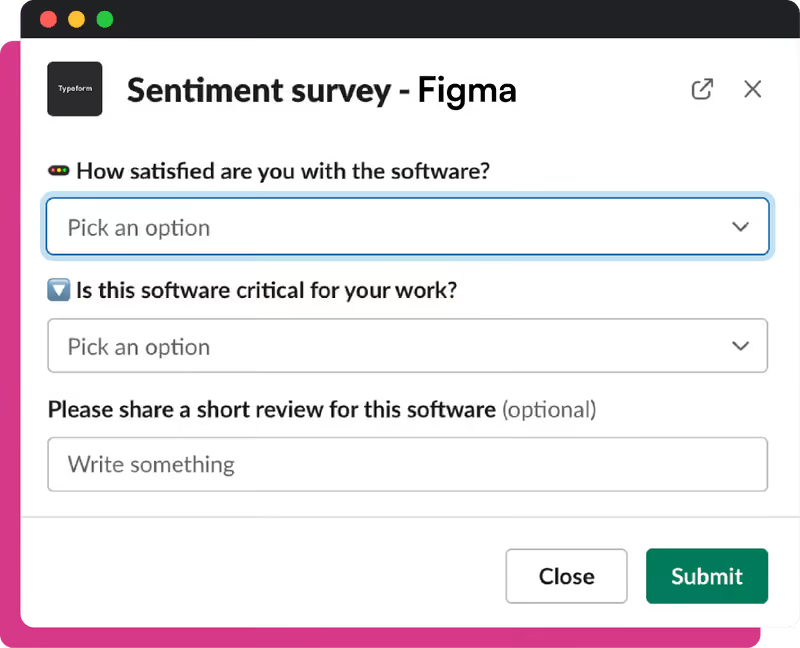
Ask your teams two specific questions:
- How satisfied are you with the software?
- How critical is it to your work?
Give them the option to leave a review or specify qualitative feedback.
Use the NPS model to understand organizational sentiment
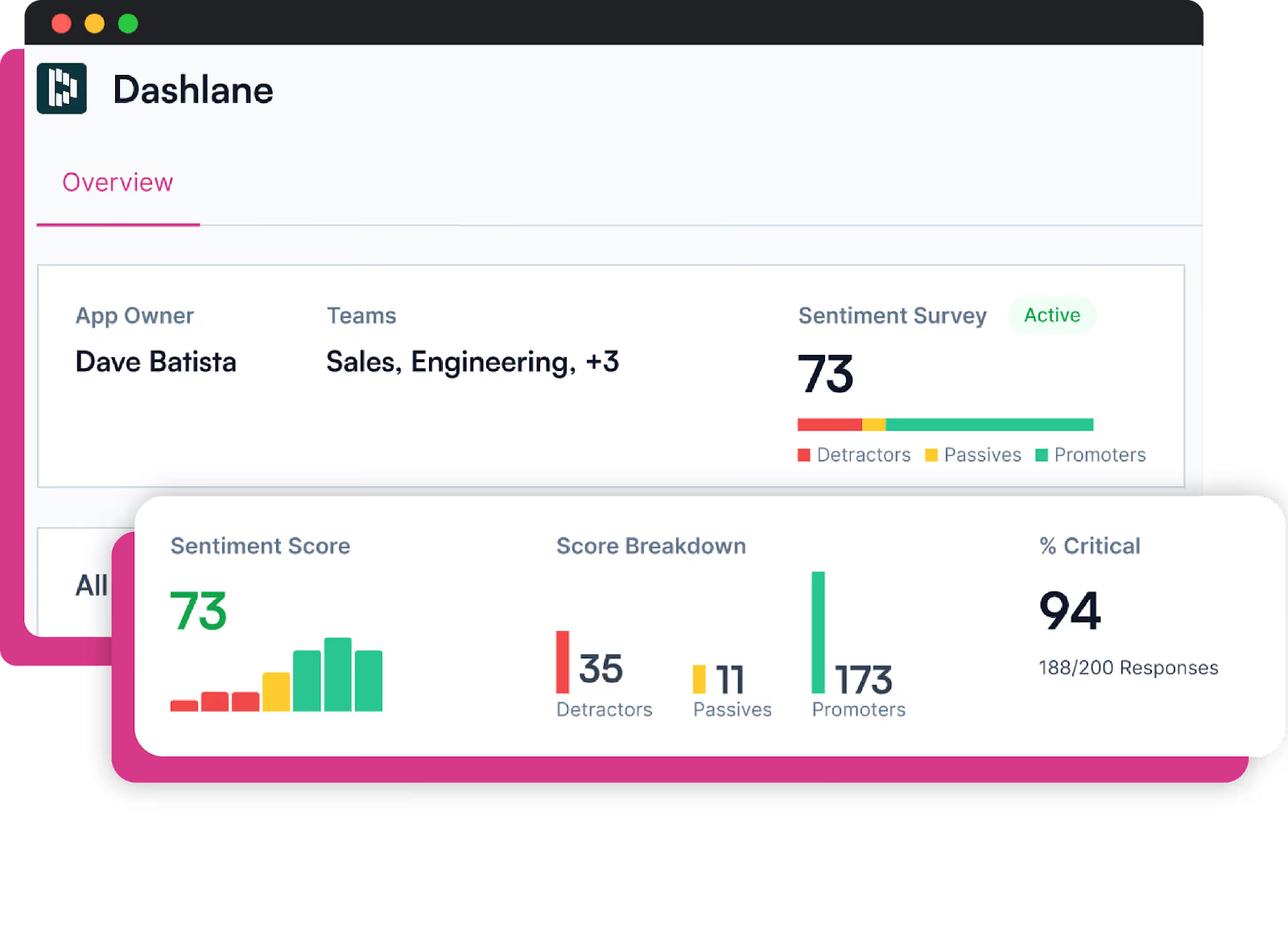
Use the NPS model to understand survey responses. The more promoters you have the better. While passives might not feel strongly about a tool, they are also less likely to use it as they don’t particularly like it.
Collect additional qualitative data
When there are a significant number of detractors or passives for a critical tool, it is important to understand why. Use interviews or detailed surveys with open-ended questions.
How you can use user sentiment data for effective decision-making
Based on the user sentiment analysis, you can fit your tools on a 2x2 sentiment score map.
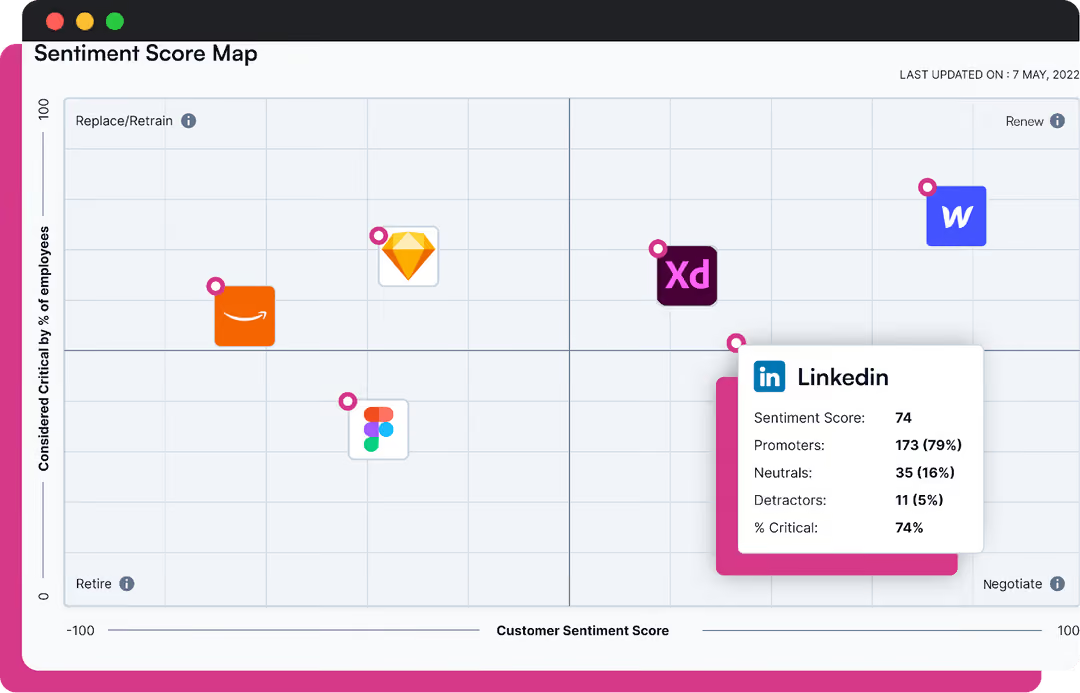
High satisfaction-high criticality: Renew
Your teams like the tool and use the tool very often. This means that the decision to renew is made. However, there still might be an opportunity to consolidate or optimize. When it’s time to renew, reconsider the contract and negotiate confidently.
Low satisfaction-low criticality: Retire
Your teams neither like nor need these tools. Cut them out entirely and save costs. Create a plan to retire these SaaS tools, ensuring that you’ve backed up all the data.
High satisfaction-low criticality: Renegotiate
While your teams love to use this tool, it is not critical to their success. Identify what they love about the tool using additional qualitative data. Then, renegotiate these tools for a better price. Given that these are not mission-critical, you have the luxury of negotiating hard with the vendor.
Low satisfaction-high criticality: Replace/retrain
The most common example of this tends to be the customer relationship management (CRM) tool. Sales team members find it tedious to use the tool, it often takes too much time, needs many clicks, isn’t available on the go etc. In fact, an average salesperson spends 4 hours a week on Salesforce. But a CRM is critical for not just that sales team, but has downstream effects on the entire organization. In such cases, consider retraining users about using the tool; evangelize it focussing on the benefits. If that doesn’t help, it’s time to explore alternative tools that do the same thing.
Leveraging the Spendflo Sentiment Hub
Most finance and procurement teams struggle to connect user sentiment with actual software usage and spend. They might know that employees dislike a tool but not why it matters to the bottom line or how much that tool is really costing them. Without context, renewal and optimization decisions become guesswork.
When a global SaaS company used Spendflo’s Sentiment Hub, they discovered that nearly 20% of their paid licenses belonged to tools users found frustrating or redundant. By acting on these insights, they consolidated contracts and saved over $400K annually, while improving employee satisfaction with the tools they kept.
The truth is, ignoring user sentiment creates hidden inefficiencies. Low adoption drives wasted spend, while high-impact tools go unnoticed.
That’s where Spendflo’s Sentiment Hub bridges the gap. It brings every insight into one place license data, usage patterns, sentiment scores, and renewal timelines so you can make confident, data-backed decisions about your software stack.
Don’t let overlooked sentiment erode ROI. Book a free demo to see how Spendflo helps you track, analyze, and act on user sentiment turning feedback into measurable savings.
FAQs
1. How do you perform user sentiment analysis?
User sentiment analysis starts with collecting feedback from surveys, reviews, and internal usage data. That information is cleaned, organized, and processed through sentiment analysis software that identifies positive, negative, or neutral opinions. Businesses can then visualize these results to uncover patterns and make informed decisions about adoption, renewals, or improvements.
2. What kind of data sources are used for user sentiment analysis?
Common data sources include employee surveys, feedback forms, chat transcripts, app usage logs, and review platforms. Some teams also analyze social media or help desk conversations to capture real-time sentiment. The goal is to combine quantitative data (like ratings) with qualitative input (like comments) for a full picture of how users feel about their tools.
3. How can businesses act on user sentiment analysis?
Once insights are gathered, businesses can use sentiment trends to guide software renewal, training, and optimization decisions. For example, tools with high satisfaction and high usage can be renewed confidently, while low-rated tools may be retrained or replaced. Acting on sentiment data ensures decisions are based on real user experience, not assumptions leading to better adoption and cost efficiency.


-compressed.avif)













.avif)
.avif)