


A procurement workflow is the structured, step-by-step path an organization follows from identifying a need all the way through to the invoice getting paid, including who has to approve it along the way. It's what turns procurement from "email the right person and hope" into something repeatable.
What is a procurement workflow?
A procurement workflow is the specific, repeatable path a purchase takes inside an organization, who submits it, who reviews it, how it becomes a binding order, and how it eventually gets paid. It's narrower than "the procurement process" as a whole; process is the broader discipline (sourcing, vendor strategy, spend management), workflow is the mechanical sequence and approval routing one purchase actually follows.
Most of what makes a workflow good or bad isn't the steps themselves, those are fairly standard, it's whether the handoffs between steps are clean or whether something gets stuck in an inbox for a week.
Not every purchase needs the same workflow
Before walking through how a purchase moves end to end, it's worth saying upfront: the version below is the full, standard path, and forcing every purchase through it, a $50 office-supplies order included, is exactly what makes a workflow feel slow and bureaucratic to the people stuck inside it.
- Simple: low-value, routine purchases, office supplies, small subscriptions, repeat orders from an existing vendor. One approver, usually the requester's manager, and the whole thing resolves same-day to a few business days. This should be the fast path, not an afterthought.
- Strategic: high-value or high-impact purchases, a new enterprise platform, a multi-year contract, anything that shapes how the business operates going forward. Multiple stakeholders weigh in, procurement may run a formal RFP, and legal reviews the contract terms. This realistically takes weeks to months, and trying to compress it defeats the point.
- Emergency: something broke, or a deadline can't move. Approval still happens, usually a verbal or email sign-off from a senior approver, but the paperwork gets completed retroactively, typically within 48 hours, rather than blocking the purchase itself.
A workflow that only has one path, built for the strategic case, makes every $50 purchase painful. A workflow that only has the simple path has no real controls once spend gets serious. The stages and approval matrix below describe the strategic, full version, since that's the one worth understanding in depth, but keep in mind it should flex by type, not apply uniformly.
How a procurement workflow actually runs, step by step
Here's what the full workflow looks like end to end, followed through a single example so the handoffs are concrete rather than abstract: a marketing manager needs a new analytics tool for her team.
- Need identification and requisition: the requisitioner, in this case the marketing manager, identifies the need and submits a purchase requisition describing what's needed, the estimated cost, and the business justification. This is the intake point, and it's also where most workflows quietly break, a requisition that never gets submitted never enters the workflow at all, which is exactly how untracked, maverick spend happens.
- Review and approval: the requisition routes to whoever's authorized to approve it at that dollar amount, based on budget availability and spending limits, covered in detail below, since this is where most workflows actually live or die.
- Vendor selection and negotiation: once approved, procurement compares two or three analytics tools against the requirement, checks pricing and terms, and in this example picks a vendor the company hasn't used before, so onboarding that supplier happens here too.
- Purchase order issuance: the approved requisition becomes a formal purchase order, item, quantity, agreed price, and payment terms, now sent to the selected vendor.
- Receipt and inspection: the marketing manager confirms the tool is active and being used as expected, and the organization verifies what it received against the purchase order, a three-way match comparing the PO, the receipt, and the invoice to catch discrepancies, the same check our P2P process guide and 3-way matching guide cover in more depth.
- Invoice processing and payment: accounts payable verifies the invoice, resolves any discrepancies, and schedules payment on the agreed terms, and the whole transaction, requisition through payment, becomes part of the audit trail.
Reading six stages in a paragraph and seeing them as a flow are different experiences, and most people trying to understand or explain a procurement workflow actually want the second one.
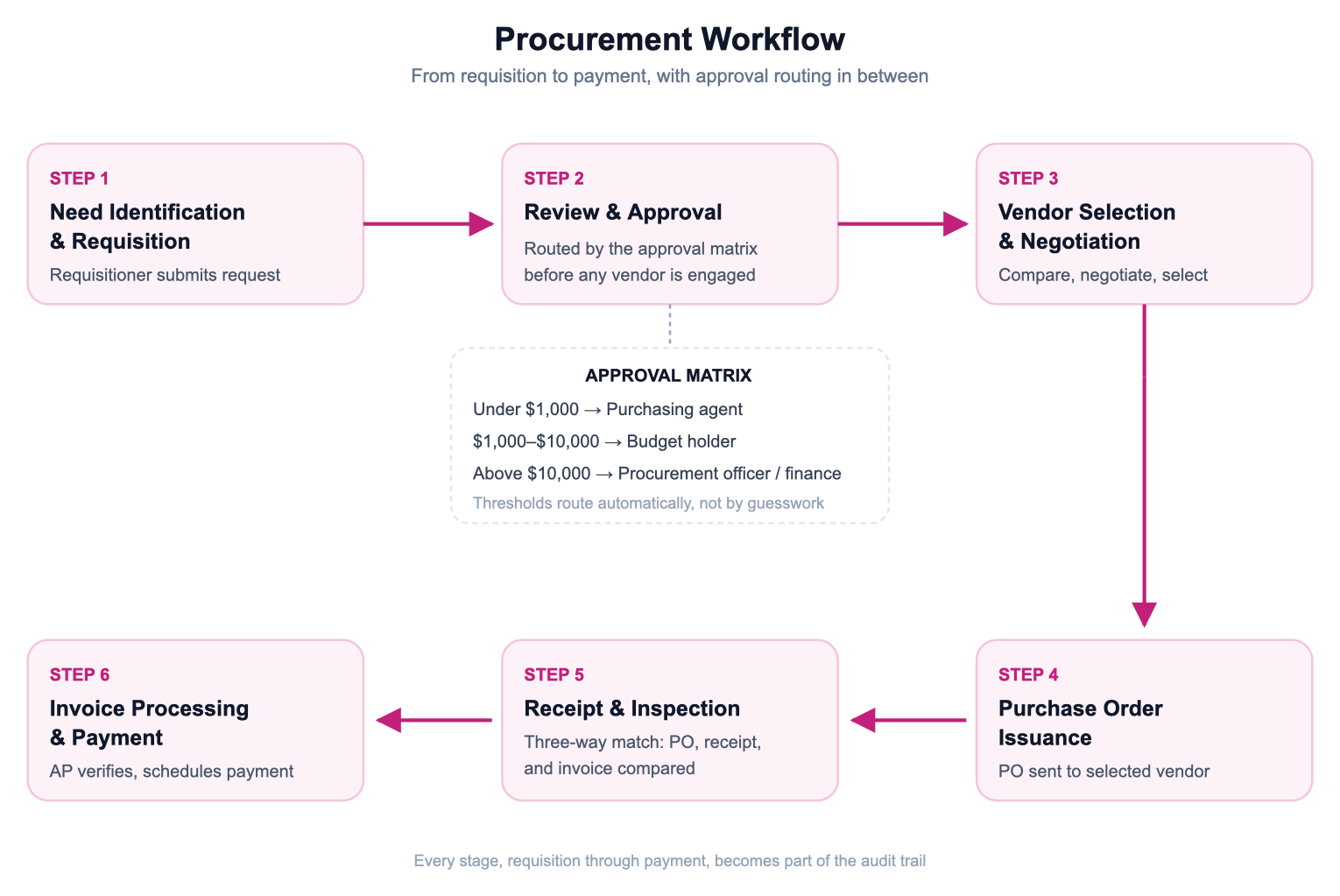
Two things worth noting on top of that flow: approval isn't always a single gate, a requisition can route through two or three approvers in sequence depending on the matrix, and receipt and invoicing often happen out of order, an invoice can arrive before goods are confirmed received, which is exactly why the three-way match exists as a checkpoint rather than an assumption.
The approval matrix: the step most workflows get wrong
Most people picture procurement approval as one person signing off on a purchase, but in practice it's an approval matrix, a set of rules that route a request to different approvers depending on dollar amount, category, or department, and this is usually the single biggest source of delay or confusion in a workflow.
A simple matrix might look like this: a purchasing agent can approve a requisition under $1,000 without escalation. Between $1,000 and $10,000, it goes to a budget holder, typically the requester's department head, who confirms the spend is within their allocated budget. Above $10,000, it escalates again, often to a procurement officer or finance, sometimes requiring a second approval if the category is considered high-risk.
Only once a requisition clears this review does it move on to vendor selection, so the approval hierarchy exists to make sure the money gets signed off before anyone starts negotiating with a supplier, not after.
Where this breaks down in practice: the matrix isn't documented anywhere accessible, so people guess who should approve something and guess wrong, or a spend threshold hasn't been updated in years and now routes routine purchases through an unnecessary extra approval step. Getting the matrix right, and visible, matters more than getting the steps right.
Where workflows break down even with a matrix in place
Having a documented approval matrix solves the guessing problem, but it doesn't eliminate every source of delay, most of the time lost in a procurement workflow isn't spent on anyone actually reviewing a request, it's spent waiting.
- Incomplete requests bouncing back and forth: a requisition missing a quote, a vendor name, or a clear business justification can't be approved as-is, so it goes back to the requester, gets fixed, and re-enters the queue, often behind newer requests.
- Unclear ownership sends things too far up the chain: when nobody's sure who's actually authorized to approve something, the safe move is escalating it, and routine purchases end up competing for the same senior approver's attention as the requests that genuinely need it.
- Routine purchases stuck in the same lane as exceptions: a repeat order from an approved vendor and a brand-new, unbudgeted contract shouldn't take the same path, but without a matrix that accounts for the difference, they do.
- Vendor and contract data living somewhere else: when approvers can't see whether a supplier is already approved or a contract already exists, they either stall the request to go check, or approve it without that context.
The fix for all four is largely the same: give the workflow enough structure that routine requests don't need a person to make a judgment call, and reserve actual human attention for the purchases where it changes the outcome.
Fixing it: what to automate first
The parts of a workflow worth automating first are the handoffs between stages, not the stages themselves, since that's where requests actually sit idle waiting for someone to notice them.
Automated approval routing sends a request to the right person based on the matrix the moment it's submitted, instead of someone manually figuring out who needs to sign off. Automated PO generation turns an approved request into a purchase order without anyone re-typing the same details.
Automated three-way matching flags a mismatch between the PO, the receipt, and the invoice immediately, rather than someone discovering it during month-end close. Most ERP and procurement systems, including SAP Ariba, Microsoft Dynamics 365, and ServiceNow, build some version of this configurable approval routing in, though exactly how flexible the thresholds and escalation paths are varies a lot by system.
The payoff shows up in real numbers, not just smoother-feeling process. Software vendor Procurify's own benchmark data put the median requisition-to-PO cycle time at 55 hours in 2025, down from the prior year, for companies running a structured, automated workflow.
And according to The Hackett Group's 2025 Procurement Agenda and Key Issues Study, procurement teams that lean into automation see meaningful productivity gains, with a subset reporting output improvements of 40% or more.
How Spendflo runs this for you
Spendflo runs the full workflow, request, approval routing, contract negotiation, and payment, inside one system, so a request doesn't sit in an inbox waiting for someone to notice it needs approval.
Because the approval matrix lives in the same platform handling intake and purchase orders, routing happens automatically the moment a request is submitted, and because every stage feeds the next, there's no re-entry between steps and no gap where a request falls through before it reaches an approver.
Frequently asked questions about procurement workflows
1. What is a procurement workflow?
The specific, repeatable sequence a purchase follows inside an organization, from request through approval, purchase order, receiving, and payment, including who's authorized to approve it at each stage.
2. What are the different types of procurement workflows?
Simple, strategic, and emergency. Simple covers low-value, routine purchases with one approver; strategic covers high-value or long-term commitments with multiple stakeholders and a formal vetting process; emergency allows urgent purchases to move forward with expedited, often retroactive, approval.
3. What are the stages of a procurement workflow?
Six in most organizations: need identification and requisition, review and approval, vendor selection and negotiation, purchase order issuance, receipt and inspection, and invoice processing and payment. Some companies combine or split these differently, but this covers the core handoffs.
4. What is an approval matrix?
A set of rules that routes a purchase request to different approvers based on dollar amount, category, or department, rather than relying on one person to approve everything regardless of size.
5. Where do procurement workflows usually break down?
Most delays come from incomplete requests bouncing back for missing information, unclear ownership escalating routine purchases unnecessarily, and approvers lacking visibility into vendor or contract data, rather than from any single step being inherently slow.
6. Which parts of a procurement workflow are worth automating first?
The handoffs between stages, approval routing, PO generation from an approved request, and three-way matching, since that's where requests typically sit idle rather than any single step being slow on its own.
7. What's the difference between a procurement process and a procurement workflow?
Process is the broader discipline, sourcing, vendor strategy, spend management. Workflow is the specific mechanical sequence and approval routing one purchase actually moves through.
8. Does every purchase need to go through the full procurement workflow?
Most organizations set a low-dollar threshold below which a simplified or self-approval path applies, but routing every purchase through some version of the workflow, even a short one, is what prevents maverick spend from slipping through untracked.


-compressed.avif)












.avif)
.avif)