
.avif)


The Hidden Bottleneck in Every Procurement Workflow
Most procurement teams have solved the intake problem. Requests come in, stakeholders are notified, approvals move along - right up until the moment someone needs an IT or security clearance before a purchase can go through.
That's where things break.
Two teams. Two tools. One broken handoff.
Procurement teams run their workflows in Spendflo. IT and security teams manage service requests in Jira Service Management. These aren't redundant tools — they serve different teams with genuinely different needs.
But when a purchase requires IT sign-off, those two worlds have to meet. And that's where things fall apart.
Someone has to manually create a Jira ticket. Route it to the right queue. Wait for the IT team to work through it. Then remember to go back and check if it's been resolved - because Spendflo has no way of knowing.
The result? Procurement stalls. Status lives in someone's head or a Slack thread. And purchases occasionally move forward before IT has actually signed off.
It's not a people problem. It's a gap between two systems that were never connected.
Introducing Spendflo x Jira Service Management: Procurement and ITSM, Finally in Sync
Spendflo's native Jira Service Management integration closes the loop between procurement workflows and ITSM approvals. Jira Service tickets are created automatically from Spendflo workflows, status is synced in real time back into Spendflo, and workflows complete or deny themselves based on the outcomes - no manual triggers, no follow-ups, no gaps.
What this means for you
Procurement, IT, and security teams no longer need to operate on separate tracks. Spendflo's JSM integration delivers:
- Automated Ticket Creation – Jira Service tickets are created directly from Spendflo workflows with projects, request types, and all required fields pre-mapped — no manual entry, no missed mandatory fields.
- Real-Time Status Sync – Jira Ticket ID, URL, and Status are pulled back into Spendflo the moment they update. A manual Sync button is also available when you need an on-demand refresh.
- ITSM-Gated Lifecycle Control – Define exactly which Jira statuses mark a workflow task as complete and which mark it as denied. Procurement only advances when your ITSM conditions are genuinely satisfied.
- Proactive, Specific Error Handling – Missing fields, invalid mappings, deleted tickets, and removed integrations each surface with their own targeted error message so your team knows exactly what to fix and where.
- Complete Audit Readiness – Every Jira interaction - ticket creation, status sync, workflow outcome - is logged inside Spendflo for full traceability.
- Zero Manual Follow-Ups – No more Slack pings or status check-ins. Workflows self-complete or self-deny based on what happens in Jira.
Core capabilities that eliminate the procurement-ITSM gap
Automate Jira Ticket Creation – Add a Jira Service Management task to any Spendflo workflow and configure it in minutes. Choose the Project, select the Request Type (which dynamically updates based on the project you've picked), and map the fields your Jira setup requires - Summary, Description, Due Date, Attachments, and any custom fields your organization has defined. When the workflow reaches that stage, Spendflo creates the Jira Service ticket automatically, with every field correctly populated and status defaulting to whatever your organization has set as the starting state in Jira.
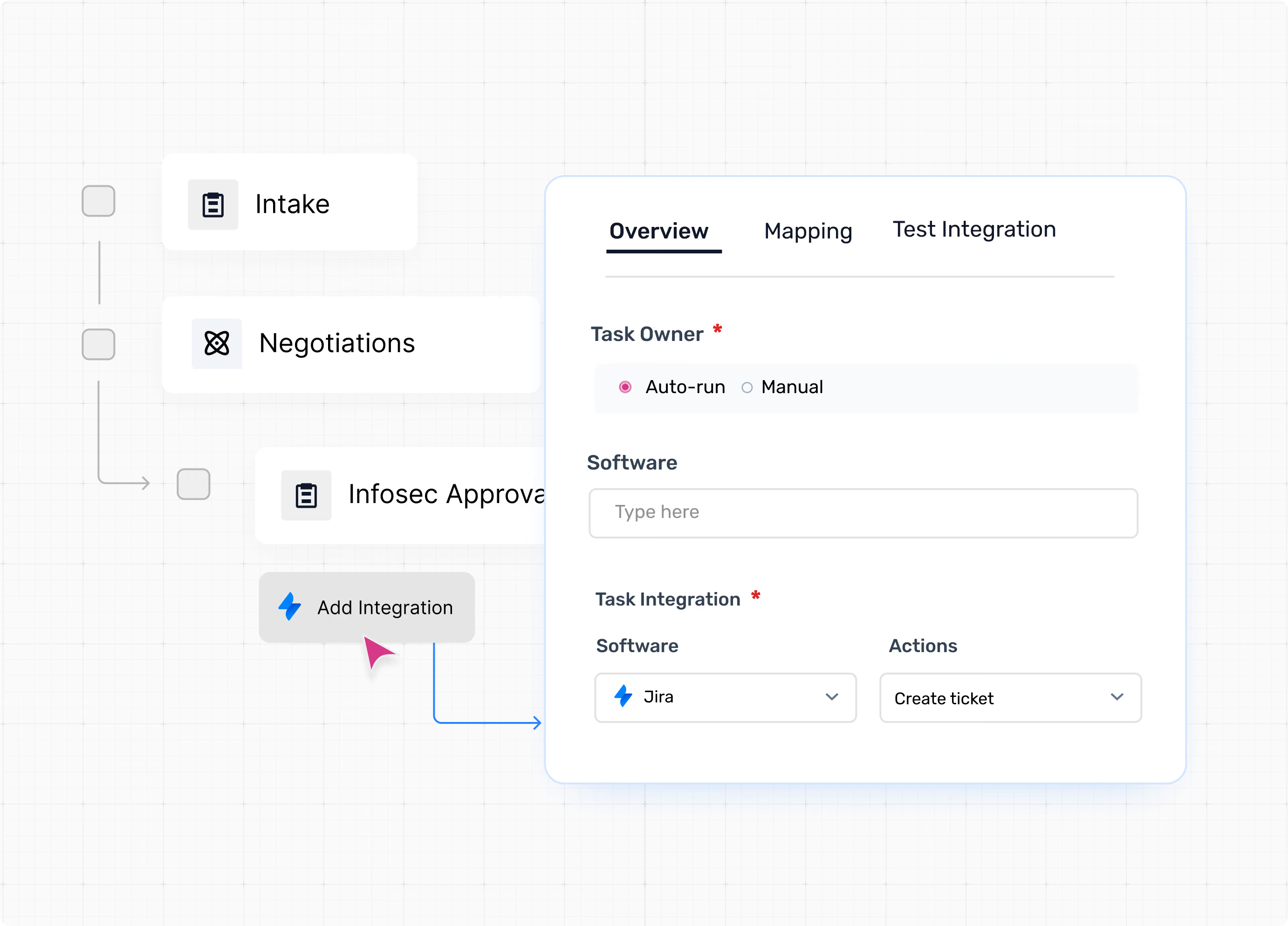
Sync Status and Visibility in Real Time – The moment a Jira Service ticket updates, Spendflo knows. Ticket ID, Ticket URL, and current Status are pulled back into the workflow in real time and displayed as part of the task's completion information. So procurement teams have full visibility without ever opening Jira. Need a manual refresh? Hit Sync. When a ticket reaches your defined Completion Status, the workflow task advances. When it hits your defined Rejection Status, the task is denied and the reason is surfaced directly - “This task is denied as the ticket is marked as [Status] on Jira.”
.avif)
Enforce Lifecycle Control – In the Mapping tab, configure Completion Status and Rejection Status as multi-select dropdowns - allowing multiple statuses to trigger each outcome. Done and Approved can both complete a task. Denied and Won't Fix can both reject it. These statuses are project- and request-type-specific, so your configuration reflects your actual Jira setup. Procurement can't move forward until Jira says it's ready.
.avif)
Reduce Integration Failures – Before publishing a workflow, validate the full integration from the Test Integration tab. Submit a real test request and Spendflo creates an actual ticket in Jira to confirm that field mapping, ticket creation, and status sync all work end to end. If something goes wrong in production, Spendflo surfaces the right error for the right problem: missing mandatory fields name the specific fields; invalid mappings identify problematic values; deleted tickets prompt you to check your Jira project; a removed integration tells you which reconnection step is needed.
.avif)
The impact
“When procurement and ITSM live in separate systems, every purchase that needs IT sign-off becomes a bottleneck. Spendflo's Jira Service Management integration bridges that gap - automatically creating tickets, syncing status in real time, and ensuring workflows only advance when ITSM conditions are actually met. It's not just a convenience feature. It's how compliant, auditable procurement is supposed to work.” - Product Team : Spendflo
Real business outcomes:
- Faster Procurement Cycles – Eliminate days of manual follow-up on ITSM approvals with automated ticket creation and real-time status sync
- Zero Missed ITSM Conditions – Multi-select lifecycle control ensures workflows never advance until the right Jira status is reached
- Reduced Audit Risk – Ticket ID, URL, status, and workflow outcomes are logged and traceable inside Spendflo
- Fewer Integration Failures – Error-specific messages catch bad mappings, missing fields, and deleted tickets before they disrupt live workflows
Cross-Team Alignment – Procurement and IT operate from the same source of truth, without either team changing their tools or processes
Connect Procurement and ITSM - Starting Today
Ready to connect your procurement and ITSM workflows?
Learn more about Spendflo's Jira integration or book a demo to see it in action.


-compressed.avif)












.avif)
.avif)